If you’ve never built a home before, estimating costs can be tricky. Even small mistakes can add tens of thousands of dollars to your budget. A construction cost calculator gives you a starting point. It provides a realistic view of what to expect.
Table of Contents
The Importance of Budget Planning
Budgeting is more than just listing numbers. It helps you make better choices about your home design, location, and materials. Without a budget, many people end up cutting corners or facing unexpected expenses.
Here’s why planning matters:
Avoid surprises: Costs for materials, labor, and permits differ widely.
Set priorities: Know where you can save and where to invest.
Manage expectations: Understand realistic costs for your dream home.
A simple calculator can give you a range rather than a single number. This range helps you plan for flexibility, so you’re not caught off guard if prices rise.
What a Cost Calculator Actually Estimates
Construction cost calculators are not magical tools, but they provide useful estimates. Here’s what most calculators cover:
Material costs: Lumber, concrete, roofing, and finishes.
Labor rates: Construction workers, electricians, plumbers, and carpenters.
Permits and fees: Local permits, inspection costs, and zoning fees.
Other local factors: Weather conditions, site prep, and contractor availability.
Some calculators also let you include optional features like luxury finishes, smart home systems, or energy-efficient upgrades.
Tip: Always remember that a calculator gives estimates. Real costs may differ, especially if you make design changes or face unforeseen challenges.
Understanding Construction Costs in the U.S. (State-by-State Differences)
Construction costs vary dramatically across the U.S. Understanding these differences is key to planning your budget. Costs depend on labor rates, material prices, local regulations, and even the type of soil on your property.
Why Costs Differ Across States
Several factors influence building costs:
Material prices: Costs for lumber, concrete, and steel differ by region.
Labor rates: Cities with high living costs usually have higher wages for builders.
Permits and inspection fees: Local governments charge different fees for construction projects.
Urban vs. rural areas: Building in a city often costs more than in small towns due to labor, regulations, and logistics.
Even within a state, costs can vary. For example, building in a rural Texas county may be cheaper than in Dallas or Austin.
Sample Cost Comparisons by State
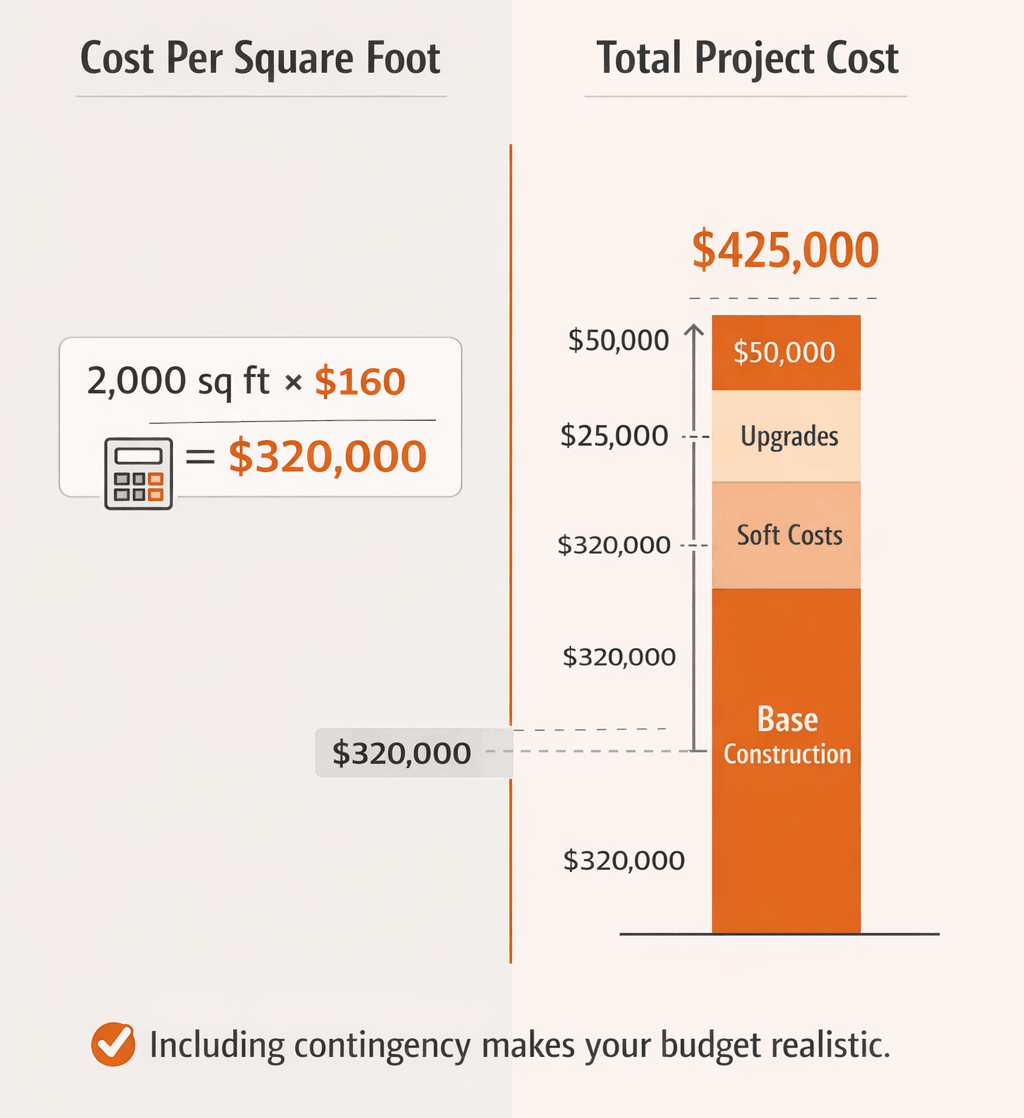
To give you an idea, here’s a table of average costs per square foot in selected U.S. states. This includes a basic estimate for a 2,000–2,500 sq ft home.
| State | Avg. Cost per Sq Ft | Total Cost for 2,000–2,500 sq Ft |
|---|---|---|
| Mississippi | $100–$150 | $220,000–$375,000 |
| Texas | $140–$180 | $280,000–$360,000 |
| Florida | $150–$220 | $300,000–$550,000 |
| California | $190–$300+ | $380,000–$600,000+ |
| New York | $200–$310+ | $400,000–$625,000+ |
Note: These costs are estimates for standard construction and do not include land. Local variations, design upgrades, and material choices can change these numbers significantly.
Key Regional Cost Insights
Here’s another way to look at how costs can vary, with a focus on urban vs. rural areas:
| Region | Cost Difference (vs. State Avg) | Notes |
|---|---|---|
| Rural Texas | -10% to -20% | Fewer permits, cheaper labor |
| Dallas Metro Area | +15% to +25% | Higher labor and land costs |
| California Coast | +30% to +50% | High permits, labor, and material costs |
| Midwest Small Town | -15% to -25% | Lower material and labor rates |
| New York City | +40% to +60% | Very high construction and permit fees |
Understanding these regional differences helps you plan better. A calculator can take your zip code as input to adjust estimates for your area.
What Goes Into Your House Construction Cost Estimate
When you look at your estimated cost, it’s helpful to know what actually goes into that number. Construction costs aren’t just about materials and labor—they include many smaller items that add up quickly.
Cost Per Square Foot vs. Total Cost
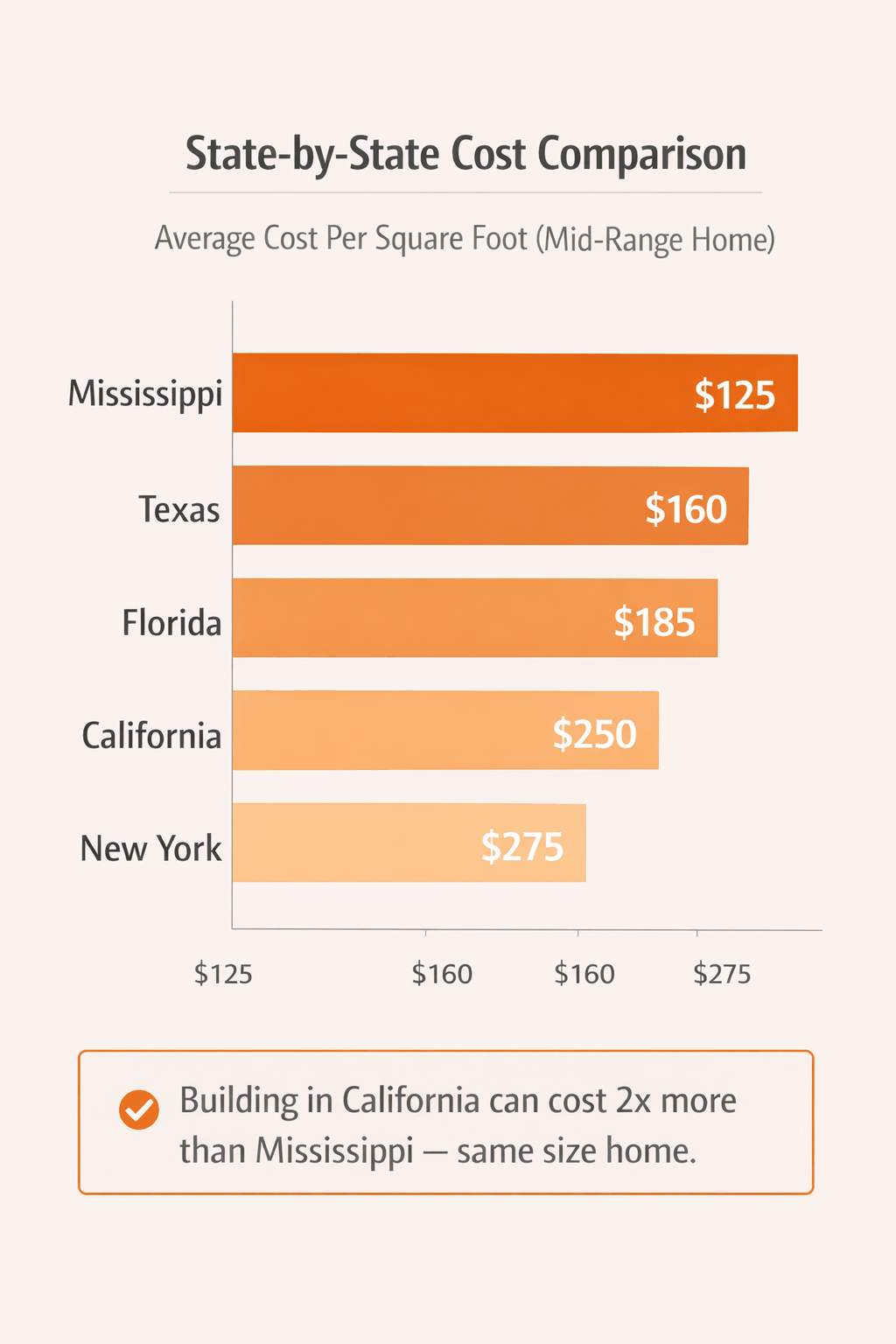
Many calculators use cost per square foot as the starting point. It’s simple: multiply the square footage of your home by the average cost per square foot in your area.
For example, a 2,000 sq ft home in Texas at $160 per sq ft would roughly cost $320,000.
Remember, this is just a baseline estimate. Final costs may vary depending on materials, labor, and special features.
Using per-square-foot estimates helps you quickly compare different designs or locations. It also makes budgeting easier when you plan upgrades or changes.
Major Cost Components
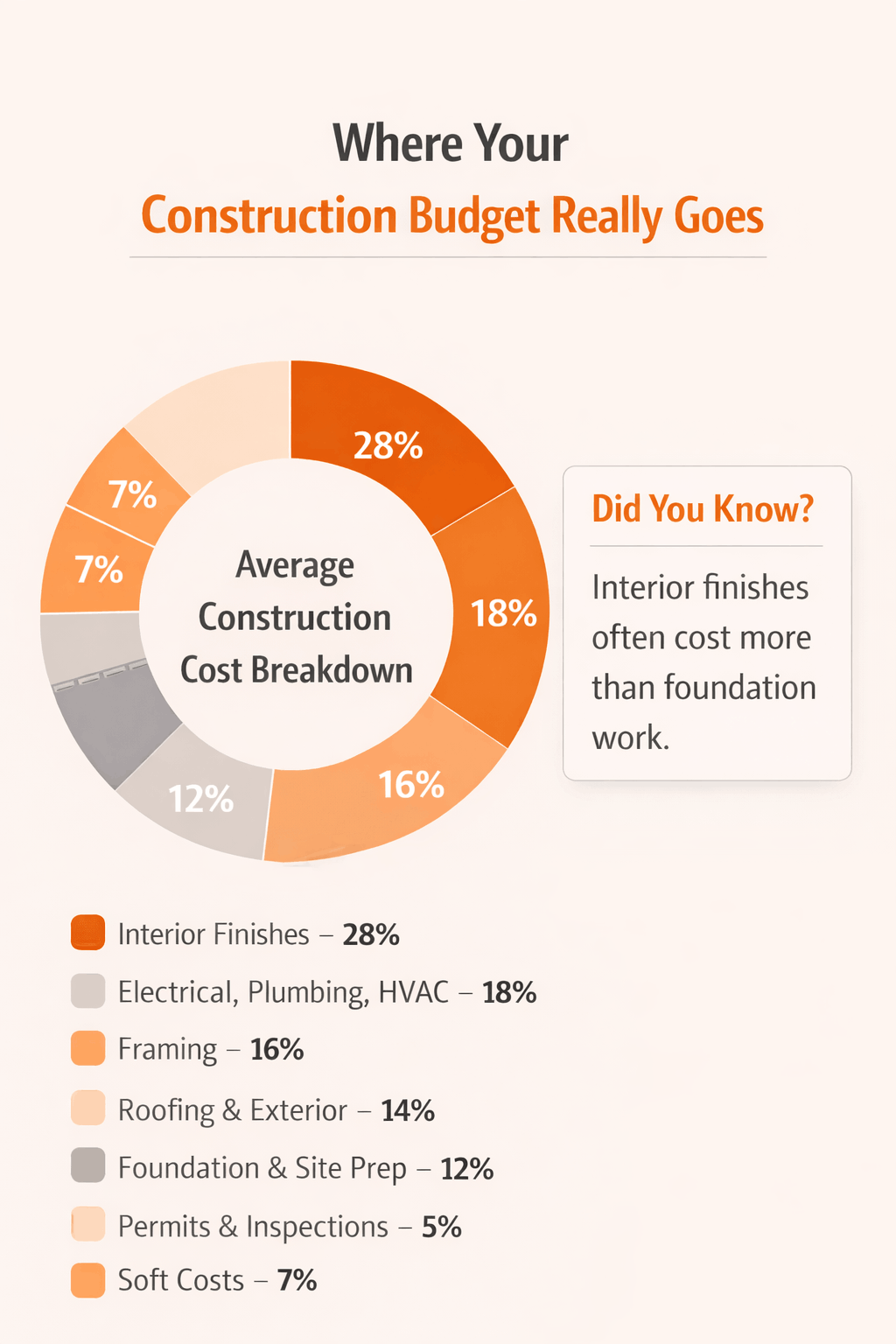
Construction costs are broken down into several categories. Knowing these helps you understand where your money goes:
Foundation & Site Prep: Clearing, grading, and pouring the foundation.
Framing: Lumber and labor to build the structure.
Roofing & Exterior: Roof, siding, windows, and doors.
Electrical, Plumbing, HVAC: Wiring, pipes, heating, and cooling systems.
Interior Finishes: Flooring, cabinets, paint, and fixtures.
Permits & Inspections: Local approvals required before moving forward.
Tip: These categories make up roughly 70–80% of your total construction cost. The rest is usually soft costs and contingencies.
Soft Costs and Hidden Fees
Soft costs aren’t as obvious, but they can add thousands to your budget. These include:
Architectural design and engineering: Plans and blueprints.
Utility connections: Bringing water, electricity, and gas to the property.
HOA compliance or impact fees: If your land is in a regulated community.
Testing and inspections: Soil tests, structural inspections, and energy audits.
Including soft costs in your estimate ensures you’re not surprised later. Many people underestimate these, which can cause delays or extra expenses.
Step-by-Step: How to Use a House Construction Cost Calculator
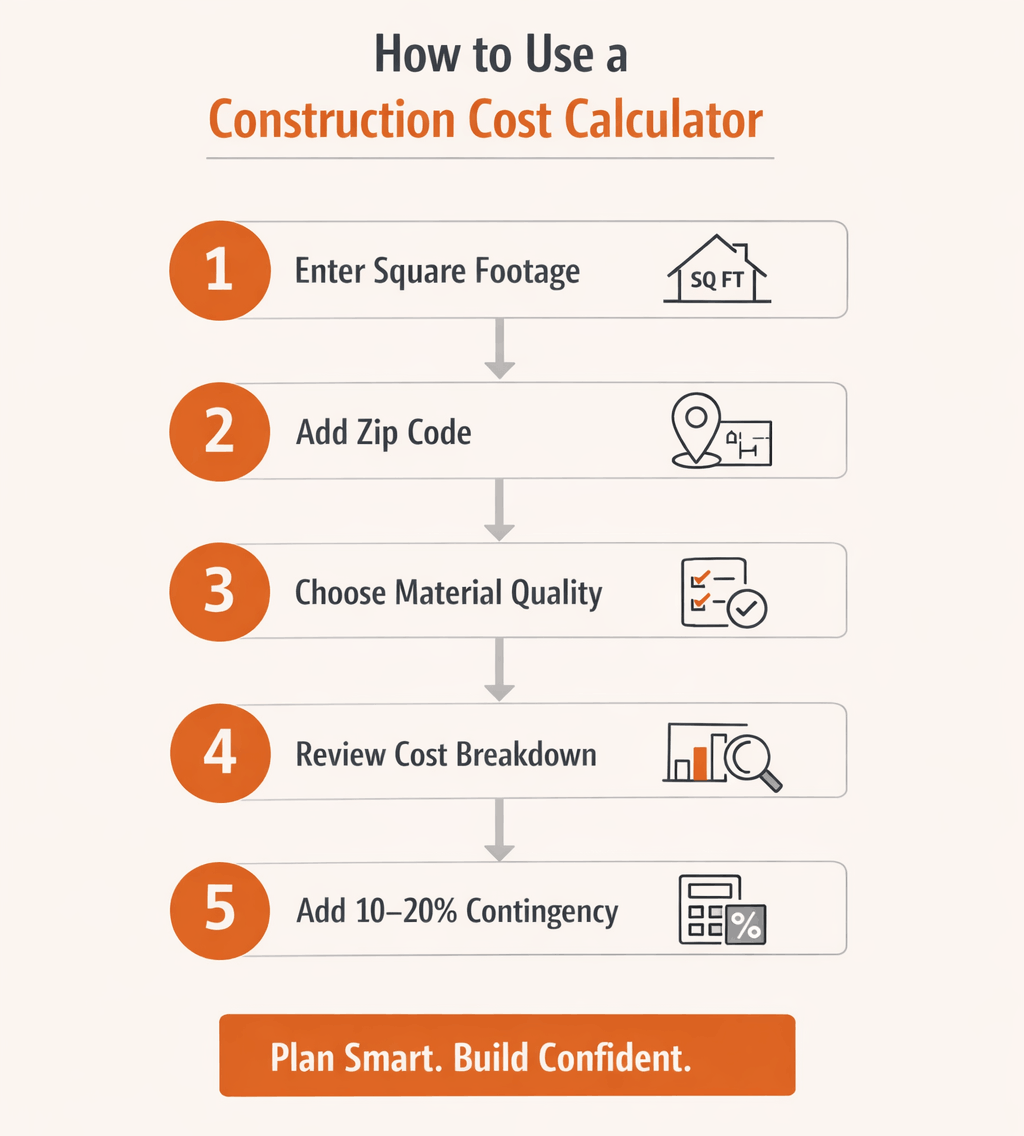
Now that you know what goes into the estimate, let’s look at how to use a calculator effectively.
Input Requirements
To get an accurate estimate, most calculators ask for a few key details:
Square footage: Total living space.
Location: State, city, or zip code to adjust for local costs.
Material quality: Basic, mid-range, or premium finishes.
Home type: Single-family, duplex, or custom designs.
Some calculators also allow you to add optional features like energy-efficient appliances, smart home systems, or landscaping.
What You’ll Get
After entering the details, the calculator typically provides:
Estimated total cost: A range rather than a single number.
Cost breakdown: Materials, labor, permits, and soft costs.
Cost per square foot: Helps compare different home designs.
Projected timeline: How long construction may take based on size and complexity.
How to Interpret Results
It’s important to understand what the calculator is telling you:
Estimates are not final bids. They are meant for planning.
Use ranges rather than exact numbers. Costs can fluctuate due to materials, labor availability, or design changes.
Adjust inputs to explore different scenarios, like upgrading finishes or increasing square footage.
Pro Tip: Always add a contingency of 10–20% to cover unexpected costs. This makes your budget more realistic.
Case Studies: Using the Calculator to Plan Real Projects
Sometimes, seeing examples makes everything clearer. Here are a few scenarios to show how a construction cost calculator works in real life.
Case 1 — First-Time Homebuilder in Texas
Home size: 2,000 sq ft
Location: Suburban Austin, Texas
Material quality: Mid-range
Estimated cost per sq ft: $160
Total estimated cost: $320,000
In this scenario, the calculator helps the builder see where the money goes:
| Cost Category | Estimated Cost |
|---|---|
| Foundation & Site Prep | $25,000 |
| Framing | $50,000 |
| Roofing & Exterior | $40,000 |
| Electrical, Plumbing, HVAC | $55,000 |
| Interior Finishes | $90,000 |
| Permits & Inspections | $10,000 |
| Total | $320,000 |
Case 2 — Building in a High-Cost State (California)
Home size: 2,200 sq ft
Location: San Diego, California
Material quality: Mid-range
Estimated cost per sq ft: $250
Total estimated cost: $550,000
High labor costs and stricter building codes push the total higher. The calculator gives the builder a realistic expectation and helps plan priorities.
| Cost Category | Estimated Cost |
|---|---|
| Foundation & Site Prep | $40,000 |
| Framing | $70,000 |
| Roofing & Exterior | $60,000 |
| Electrical, Plumbing, HVAC | $90,000 |
| Interior Finishes | $200,000 |
| Permits & Inspections | $30,000 |
| Total | $550,000 |
Case 3 — Small vs. Large Homes
Small homes have higher per-square-foot costs for custom features because economies of scale are smaller.
Larger homes may reduce per-square-foot cost but increase total spending.
Using the calculator, builders can compare scenarios and make informed choices about size, layout, and finishes.
Takeaway: The calculator isn’t just for rough numbers. It helps you plan budgets, test scenarios, and set realistic expectations before signing contracts.
Tips for More Accurate Estimates
Even the best calculators are only as accurate as the information you provide. A few smart steps can make your cost estimate much closer to reality.
Go Local — Zip Code Matters
Costs vary even within the same state. A home in a rural area may cost significantly less than a similar home in a city. Calculators that allow you to input a zip code give more precise results.
Labor rates differ by city.
Material costs can vary by distance from suppliers.
Permits and inspection fees change between municipalities.
Plan for Inflation and Material Price Changes
Construction materials fluctuate in price, sometimes dramatically. Planning for this helps avoid surprises.
Lumber, steel, and concrete can spike depending on supply and demand.
Consider locking in quotes early with your contractor.
Add a buffer of 5–10% for potential cost increases.
Get Multiple Bids and Adjust Your Plan
Even if a calculator gives a good estimate, actual bids may differ.
Compare multiple contractors to understand local labor rates.
Adjust your design or materials based on quotes.
Keep track of trade-offs: cheaper materials may save money but affect long-term durability.
Tip: Use the calculator as a planning guide, then refine with real-world quotes for a more reliable budget.
Common Mistakes to Avoid With Construction Cost Estimates
Even experienced builders sometimes overlook key costs. Avoiding these mistakes can save time and money.
Ignoring site preparation: Land grading, drainage, and soil stability are essential.
Forgetting permits & inspection fees: Skipping these can halt construction.
Overlooking finishes and upgrades: Cabinets, flooring, and fixtures can double costs if not planned.
Skipping contingency budgeting: Always plan 10–20% extra for unexpected expenses.
Assuming one-size-fits-all: Local labor, materials, and regulations can change costs drastically.
Remember: Accurate estimates come from careful planning, realistic assumptions, and cross-checking with local contractors.
Conclusion — Making Smarter Construction Investments
Building a home is one of the biggest investments most people make. Knowing the likely costs before you start can save stress, time, and money. A house construction cost calculator gives you a practical starting point, helping you plan your budget more confidently.
By considering state-by-state differences, major cost components, and real-world examples, you can make better decisions about design, materials, and labor. Using calculators along with multiple contractor quotes ensures your estimates are grounded in reality.
Key Takeaways
Construction costs vary widely across the U.S. and even within the same state.
Cost per square foot helps simplify budgeting, but don’t forget soft costs and permits.
Accurate estimates depend on realistic inputs, local factors, and contingency planning.
Comparing scenarios with a calculator can highlight trade-offs and help you prioritize features.
Investing time in planning now can prevent surprises later. When you understand costs and plan carefully, building your dream home becomes less stressful and more predictable.
Take the Next Step
Use the JDJ Consulting House Construction Cost Calculator to get a clear estimate for your state and home size.
Adjust inputs to reflect your materials, finishes, and optional upgrades.
Contact our team if you need custom guidance or personalized planning for your construction project.
With careful planning and the right tools, you can confidently build your new home without worrying about unexpected costs.
FAQs: Why You Need a Construction Cost Calculator Before You Build
What is a house construction cost calculator?
A house construction cost calculator is an online tool that estimates the cost of building a home based on inputs such as location, square footage, material quality, and home type. It provides a cost breakdown by category, including labor, materials, permits, and soft costs. While estimates are not exact, they give homeowners a practical starting point for budgeting and planning construction projects.
How accurate are construction cost calculators?
Construction cost calculators typically provide estimates within 10–20% of actual costs if inputs are accurate. Accuracy depends on factors like local labor rates, material prices, design complexity, and permit fees. Always treat the calculator’s output as a budgeting tool, not a final cost. Adding a contingency of 10–20% can help cover unexpected expenses.
What inputs do I need for a cost calculator?
Most calculators require:
Square footage of the home
Location (state, city, or zip code)
Home type (single-family, duplex, custom)
Material and finish quality (basic, mid-range, premium)
Some calculators also allow optional features like energy-efficient appliances or smart home upgrades, which can affect the total estimate.
Does the calculator include land costs?
Most construction cost calculators exclude land value. They focus on building costs, including labor, materials, and permits. To plan your total budget, you should add the land purchase price and related fees separately.
Can I estimate costs for custom homes?
Yes, calculators can provide a range for custom homes, but exact costs depend on design complexity, unique materials, and specialized labor. Use the calculator to compare different scenarios and adjust your budget for premium finishes or unique layouts.
How do construction costs vary by state?
Construction costs differ due to:
Local labor rates
Material availability
Permit and inspection fees
Urban versus rural locations
For example, California and New York typically have higher costs than Mississippi or Midwest states. Even within a state, city and rural areas can vary significantly.
Why is square footage used for cost estimates?
Cost per square foot simplifies budgeting by allowing easy comparison of home sizes and designs. Multiplying the square footage by local cost per square foot provides a baseline estimate, making it easier to plan upgrades or changes.
What are major cost components of building a home?
The main cost categories include:
Foundation and site preparation
Framing
Roofing and exterior
Electrical, plumbing, HVAC
Interior finishes
Permits and inspections
These typically account for 70–80% of total construction costs.
What are soft costs?
Soft costs are indirect expenses not directly tied to building materials or labor. They include:
Architectural and engineering fees
Utility connections
Soil tests and inspections
HOA compliance fees
Including soft costs ensures your budget reflects the true project cost.
How do permits affect total cost?
Permit fees vary by city and state and are required for legal compliance. Costs depend on the home size, type, and complexity. Ignoring permits can halt construction and lead to fines, so it’s essential to include them in estimates.
How can I adjust estimates for upgrades?
To adjust for upgrades:
Increase per-square-foot cost for premium materials
Add labor for specialized installations
Include extra time and cost for complex designs
This ensures your estimate accounts for higher-quality finishes or custom features.
Should I use multiple calculators?
Yes. Using multiple calculators allows you to compare results and account for variations in local data. This can help identify discrepancies and refine your budget planning.
How do construction loans influence budgeting?
Construction loans may cover land and building costs, but terms vary. Interest rates, draw schedules, and repayment timelines can affect cash flow. Understanding your loan ensures your budget aligns with loan disbursement and payment obligations.
Can a calculator predict construction timelines?
Some calculators provide rough timelines based on home size, design, and complexity. While helpful, actual construction may take longer due to weather, permit delays, or contractor availability.
Why should I include a contingency budget?
Unexpected costs like site issues, labor shortages, or material price increases can occur. Adding a 10–20% contingency protects your budget and avoids financial stress during construction.
How do urban and rural locations affect cost?
Urban areas typically have:
Higher labor and permit costs
Limited contractor availability
Higher material delivery fees
Rural areas often have lower labor rates and fewer fees, but site preparation may be more challenging depending on terrain.
What is the difference between per-square-foot cost and total cost?
Per-square-foot cost provides a simple unit price for comparison.
Total cost multiplies the unit price by the total square footage and includes soft costs.
Both are important for realistic budgeting and planning.
How do I plan for material price changes?
Material costs can fluctuate over time. To plan effectively:
Lock in quotes early
Track price trends for lumber, steel, and concrete
Include a buffer in your budget for potential increases
This prevents surprises during construction.
Can I use the calculator for remodeling or additions?
Yes, many calculators allow input for additions or remodels. Include updated square footage, material upgrades, and labor to get accurate estimates.
How do I choose between contractors using estimates?
Compare bids by:
Reviewing cost breakdowns for labor, materials, and permits
Checking timelines and warranties
Considering local experience and references
This ensures your project stays on budget and meets quality expectations.
How do you calculate the construction cost of a house?
Calculating the construction cost starts with your square footage and the cost per square feet in your area. A simple formula is:
Square footage × Cost per square feet = Base Estimation
Then, add:
Labor costs and subcontractor costs
Equipment costs
Permits, design fees, and inspections
How big of a house can you build for $200,000?
The size depends on your local construction costs and finish levels. For example:
If cost per square feet is $160 → $200,000 builds ~1,250 sq ft
Higher-end finishes or luxury homes features reduce the area you can afford
A Cost To Build A House Calculator lets you tweak size, finishes, and optional features like:
Finished basement
Garage additions
Custom touches
This helps plan your dream home realistically.
How to calculate how much it would cost to build a house?
Start with your design vision: architectural style, roof designs, and any custom design changes. Then, estimate:
Hard costs: Materials, labor, and subcontractors
Soft costs: Permits, inspections, utility connections
A 10–20% buffer for unexpected expenses
How do you estimate the cost of building a house?
To estimate costs:
Consider your project location and local regulations
Use RSMeans Square Foot Costs and residential construction data
Input square footage, finish levels, and home type into a House Construction Cost Calculator
The calculator provides a realistic construction cost estimate, including:
Subcontractor costs
Equipment costs
Optional features for custom homes
This approach helps you balance budget with your dream home expectations.
What are the main factors that influence house construction costs?
The biggest factors include:
Square footage and layout
Labor costs and availability of skilled home remodelers
Material prices and supply
Project location and local tax rates
Architectural style, roof designs, and custom design changes
Optional upgrades like finished basement, garage additions, or luxury homes
These elements determine both your hard cost and overall project budget.
How do cost calculators account for hidden or unexpected expenses during construction?
Most House Construction Cost Calculators include:
Soft costs for permits, inspections, and utilities
Contingency sections for unexpected expenses