Miami’s construction market is busy. Because of that, permits are required for most projects.

Under Florida Building Code Section 105, a permit is required for most construction work. In Miami, any major change needs approval. This includes building a new home or addition. It also includes installing electrical, plumbing, or HVAC systems. Adding fences, decks, or pools also requires a permit.

Some small jobs may not need a permit. For example, painting or installing new flooring. However, all work must still follow the Florida Building Code.

This guide explains what homeowners, contractors, architects, and developers need to know. It covers who needs a permit, what projects require approval, and how to apply step by step. You will also learn about required documents, fees, review timelines, and tips to avoid delays.

Why Permits Are Required

Permits protect safety and ensure code compliance. They also confirm zoning rules are followed.

In Florida, almost all major construction must be reviewed and approved before work begins. This includes new buildings and major repairs. The City checks plans to confirm they meet building codes. These codes cover wind resistance, structural safety, fire protection, and more.
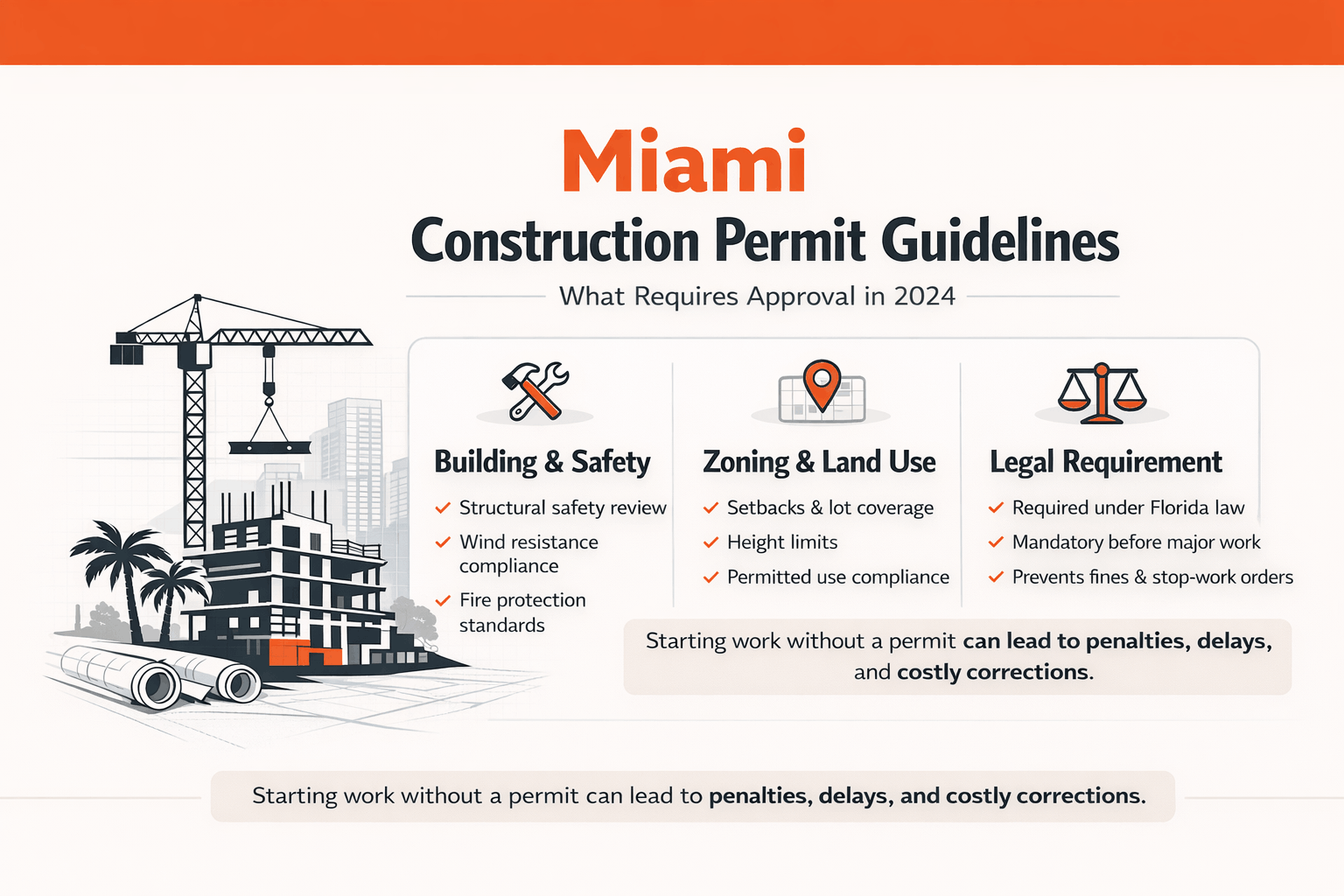
Miami construction permit requirements infographic with safety, zoning, and legal highlights
Overview of why construction permits are required in Miami, including safety, zoning compliance, and legal obligations under Florida law.

Permits also confirm that projects meet local zoning and land-use rules. This includes setbacks, height limits, and lot coverage rules.

In Miami, starting work without a required permit can lead to fines. It can also result in stop-work orders or expensive corrections later. For this reason, always confirm whether your project requires a permit before you begin.

  • Building & Safety: Permits ensure structures are safe and built according to code.

  • Zoning & Land Use: Permits confirm the project follows Miami’s zoning rules, including setbacks, permitted uses, and height limits.

  • Legal Requirement: Florida law requires permits for most new construction and major renovations.

Who Needs a Permit – Homeowners, Contractors, Developers, Architects

Anyone acting as the owner-builder or contractor is responsible for obtaining permits. This includes the following groups:

  • Homeowners (Owner-Builder): If you plan to build or significantly remodel your own home, you must apply for permits as the property owner. You may also need to complete an Owner-Builder Affidavit.

  • Licensed Contractors: For most projects, a licensed general contractor or subcontractor pulls the permit. They become the permit holder. The contractor must hold an active Florida license and be registered with the City of Miami.

  • Architects/Engineers: These professionals often prepare the construction plans. They may submit the permit application on behalf of the owner or developer. They can sign and seal required documents and help manage the approval process.

  • Developers/Investors: Larger projects, such as multi-family or commercial developments, usually involve a full team. This may include architects, engineers, contractors, and permit expediters. These teams manage permits from pre-construction through final approval.

All applicants must provide accurate contact information and proper signatures.

Even if you are building on your own property, the permit process cannot be skipped. Owner-builders must follow the same legal steps. Anyone performing licensed work must meet Florida licensing and City registration requirements.
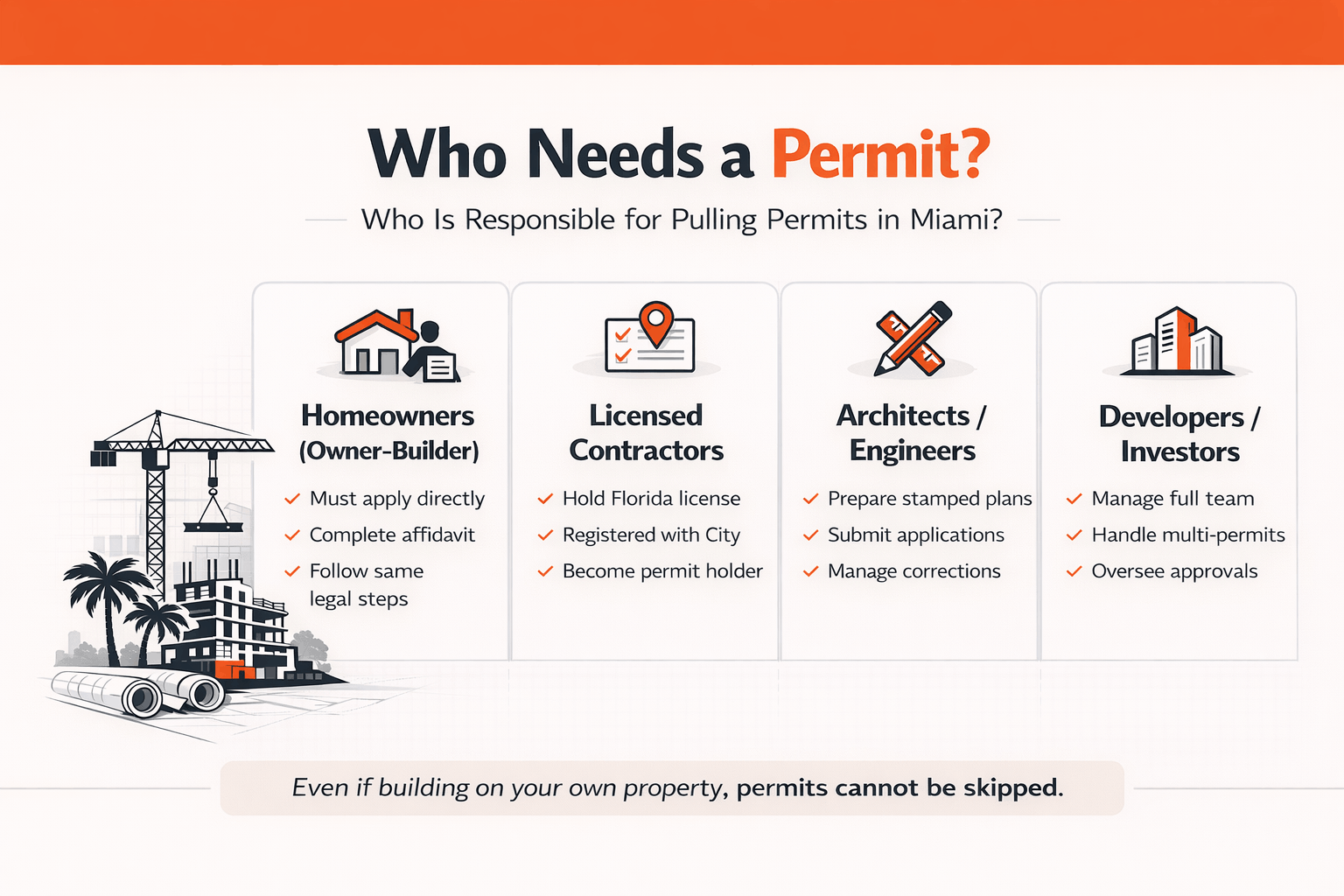
Breakdown of who is responsible for pulling construction permits in Miami, including homeowners, contractors, architects, and developers.

Projects Requiring Permits (and Common Exemptions)

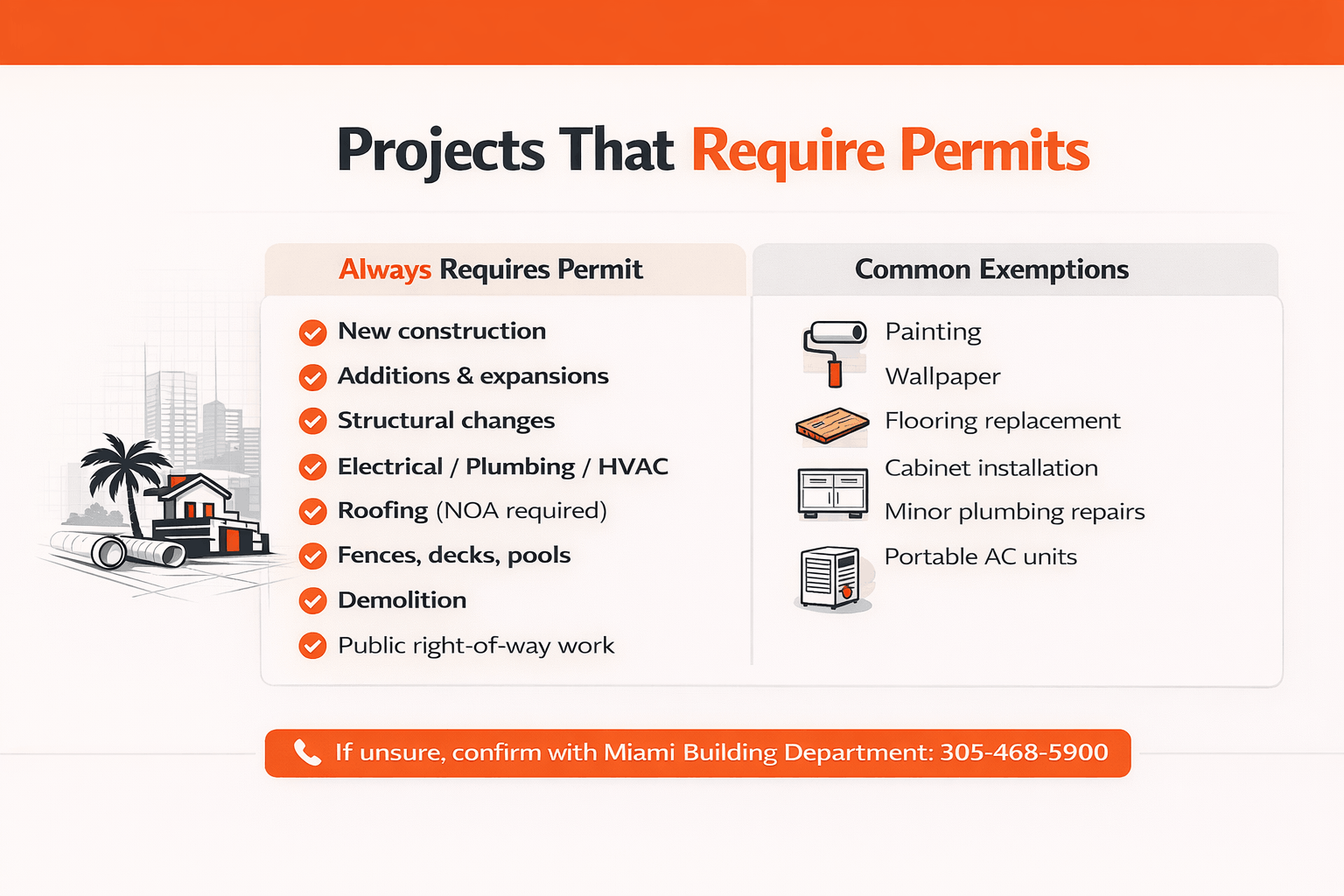
In Miami, the following projects always require permits:

  • New construction or additions:
    Building a new home, adding a room, enclosing a patio, or expanding an existing structure requires a permit.

  • Structural alterations:
    Removing or adding load-bearing walls, changing roof lines, or finishing a basement requires approval.

  • Mechanical, Electrical, or Plumbing work:
    Installing or upgrading major systems needs a permit. This includes new AC units, electrical wiring, plumbing lines, or gas lines.

  • Exterior or site work:
    Fences, retaining walls, decks, swimming pools, or major grading of land require permits.

  • Roof replacements or repairs:
    Roofing projects require a permit. In addition, Miami requires all roofing materials to have a Miami-Dade Notice of Acceptance (NOA) or Florida Product Approval.

  • Signs, demolitions, and special structures:
    Installing business signs, demolishing a building, or building specialty structures requires permits.
cta banner jdj

Exemptions

Some minor or cosmetic jobs do not require permits. However, they must still follow building and zoning codes.

Examples include:

  • Painting walls

  • Installing wallpaper

  • Replacing floors or cabinets

  • Unclogging drains or minor plumbing repairs

  • Using portable AC units

In some cases, simple gutters, small residential fences, or playground equipment for a home may also be exempt.

However, any work involving structural changes, major systems, or significant exterior improvements will require a permit.

If you are unsure, contact the City of Miami Building Department at 305-468-5900 or visit their website to confirm. Even if work is exempt, it must still follow code. Unpermitted work can result in fines or other penalties.

Types of Construction Permits in Miami

Miami issues different permits based on the type and scope of work. The main permit types include:

  • Building Permit:
    This is the primary permit for structural construction, additions, renovations, and foundations. It usually covers the overall project.

  • Trade Permits:
    Separate permits are required for Electrical, Plumbing, and Mechanical (HVAC) work. These are issued under the main building permit but require separate plans and inspections.

  • Roofing Permit:
    Required for roof replacement or installation. Approved material documentation, such as a Miami-Dade NOA or Florida Product Approval, must be included.

  • Fence or Wall Permit:
    Required for new fences, walls, gates, or major changes to existing ones. Even a basic wood fence may require a permit, especially if it exceeds certain height limits.

  • Demolition Permit:
    Required to tear down structures, including partial demolitions. The City tracks all active demolition permits.

  • Public Works Permit:
    If your project affects the public right-of-way, you will need a separate permit. This includes curb cuts, new driveways, sidewalk repairs, or water and sewer connections. These permits are handled through a different City portal.

  • Planning or Zoning Permits:
    Special approvals are required for non-standard uses. Examples include rezoning requests, conditional uses, variances, historic preservation approvals, or environmental reviews. These are handled by the City’s Planning Department and its Hearing Boards before a building permit is issued.

  • Temporary Permits:
    A Temporary Certificate of Occupancy (TCO) may be issued if part of a building needs to be used before final completion.

  • Certificates:
    After construction, you must apply for a Certificate of Occupancy (CO) or Certificate of Completion (CC). This officially closes the permit. Commercial businesses must also obtain a separate Certificate of Use (CU) before opening.
Pre-Application Planning and Approvals

Before you submit a building permit, confirm your project meets Miami’s land-use and zoning rules.

Each neighborhood and zoning district has its own limits. These rules cover setbacks, lot coverage, building height, and allowed uses. If your project does not meet these rules, your permit will be delayed or denied.

Here are the essential steps to complete before applying:

  • Zoning Review:
    Confirm that your property is zoned for the intended use. For example, residential, commercial, or mixed-use. Review the City of Miami zoning map and zoning code to verify compliance.

  • Site Plan Approval:
    Some projects, especially multifamily or commercial developments, require formal site-plan review. The City may require an Administrative Site Plan Review (ASPR). This approval can lock in your site plan for up to three years before construction begins.

  • Public Meetings and Boards:
    If your project requires a variance, exception, or rezoning, it must go before the Planning, Zoning & Appeals Board (PZAB) or the Historic and Environmental Preservation Board (HEPB). In many cases, a pre-application meeting is required to receive early feedback.

  • Environmental or Historic Review:
    Projects located on historic properties or environmentally sensitive land may require additional review and approval.

  • Homeowners’ Association (HOA) Approval:
    If your property is within an HOA, obtain written approval if required before applying for permits.

The key is to identify special approvals early. A complete building permit application should reference all required planning approvals.

If a planning or entitlement approval is required first, obtain it before or at the same time as your building permit. Keep copies of zoning certificates, approval letters, and related documents ready for submission.

Many professionals recommend scheduling a pre-submittal meeting with the City. This helps clarify requirements and reduce unexpected issues later.

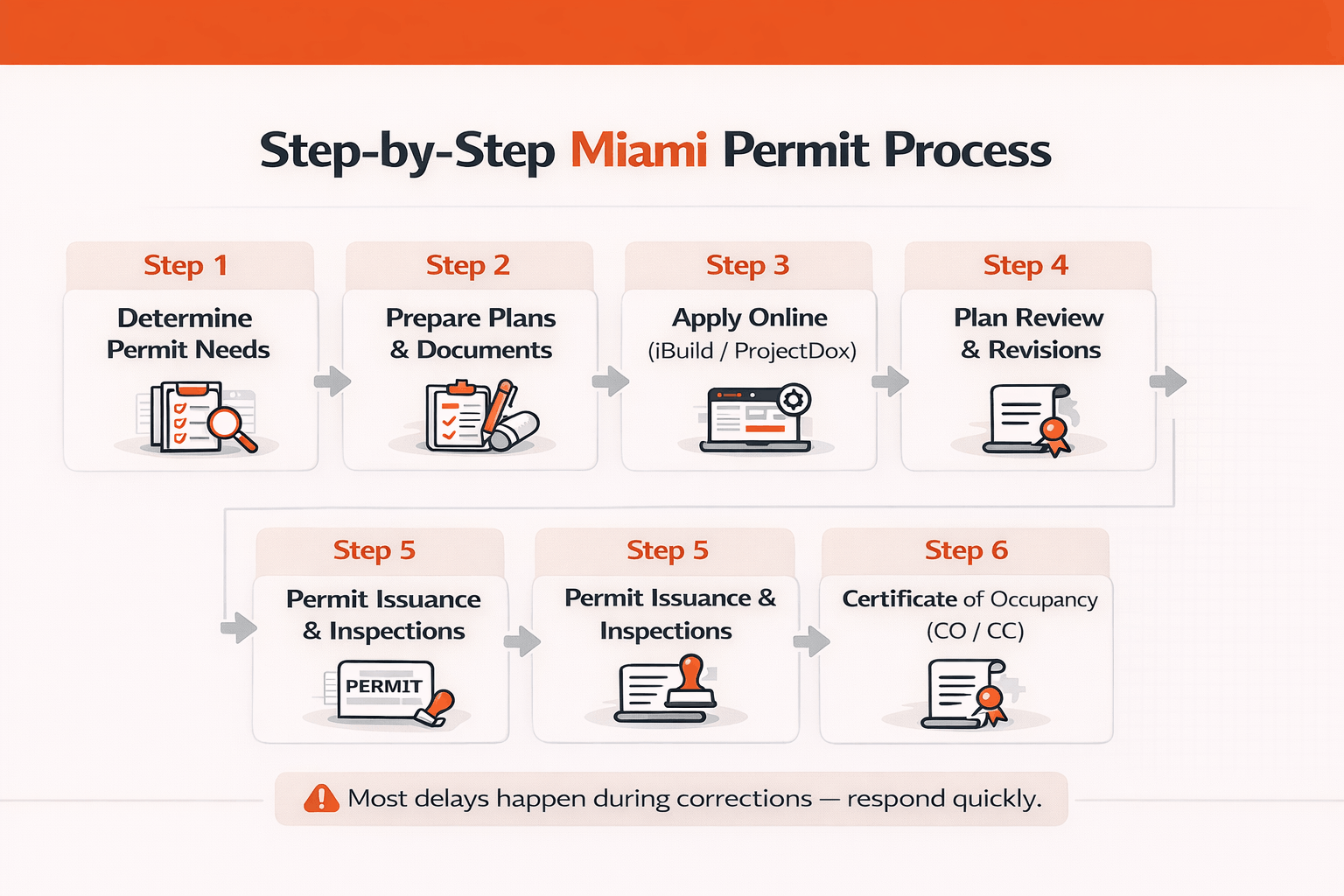
Miami Permit Application Process: Step-by-Step

Miami’s permitting process is mostly digital. Most applications are submitted online through City portals.

Below is the basic process:

  • Determine Permit Requirements:
    Identify every permit your project requires. This may include structural and trade permits. Review the City’s Permit Catalog and Permitting Landing Page for checklists and required forms.

  • Prepare Plans and Documents:
    Gather and finalize all required documents. Plans must be signed and sealed by licensed engineers or architects when required. Follow the City’s file naming rules and format guidelines.

  • Apply Online:
    Submit your application through the correct portal.

    • Use iBuild for most building permits.

    • Use ProjectDox/ePlan for plan uploads and planning permits.

    • Use the Public Works App for right-of-way permits.

    Pay the required upfront fees. This includes a $40 application fee plus initial plan review deposits.

  • Plan Review:
    After submission, the Building Department and other departments review your application. This may include Planning, Zoning, Fire Rescue, Transportation, and Utilities. Review times vary by department.

  • Respond to Corrections:
    Reviewers often issue comments or request revisions. You must respond electronically through the portal. Provide clear and complete responses to avoid delays.

  • Permit Issuance:
    Once all departments approve the plans, the City issues the permit. You will pay the remaining balance of the permit fee. After payment, the permit card is released.

  • Inspections and Completion:
    Begin construction only after the permit is issued. Schedule inspections at required stages, such as footing, framing, and electrical.

    After passing final inspections, the City issues a Certificate of Occupancy (CO) or Certificate of Completion (CC). Commercial properties may also require a Certificate of Use (CU) before occupancy.

Each step may include additional tasks, such as fee payments or meetings. However, staying organized and using the City’s online tracking tools will help keep the process on schedule.

Step 1: Determine Permit Needs

Start by identifying every permit your project requires.

Most projects require more than one permit. For example, a home addition may require a building permit, electrical permit, plumbing permit, HVAC permit, and possibly a fence permit.

Overview of major construction permit categories in Miami, including building, trade, roofing, zoning, public works, and occupancy certificates—each with separate requirements and fees.

To avoid problems later, take these steps:

  • Consult the Permit Catalog:
    The City of Miami website includes a Permit Catalog. It lists common permits and their requirements, such as roofing permits or fence permits. Review the checklist for each permit that applies to your project.

  • Check Zoning Use:
    Confirm that your proposed work is allowed on the property. Verify the zoning category, permitted uses, and number of units allowed. If a zoning exception or variance is required, apply for that approval first.

  • Identify Specialty Permits:
    Some projects require additional permits. These may include demolition permits, Public Works permits for sidewalk or driveway changes, or fire sprinkler and fire alarm permits for commercial buildings.

  • Plan for Multiple Permits:
    Certain projects require several permits at once. For example, installing a swimming pool may require separate permits for the pool structure, electrical work, fencing, and plumbing.

Creating a full list of required permits early helps prevent delays. You can also contact the City’s Permitting Office or use their online checklist tool to confirm you have not missed anything.

Step 2: Prepare Required Documents and Plans

Before applying, gather all required documents. Submitting a complete package reduces review time and correction requests.

Typical requirements include:

  • Permit Application Forms:
    Complete the Building Permit application and any required trade permit applications. If acting as an owner-builder, include the required owner-builder verification.

  • Construction Plans:
    Provide full architectural and engineering drawings. These should include floor plans, elevations, and sections. Plans must be drawn to scale and meet Florida Building Code standards.

  • Site Plan:
    Submit a current survey or site plan. It must show property lines, setbacks, existing structures, proposed structures, and the work area clearly marked.

  • Structural Calculations and Sealed Documents:
    Larger projects often require structural calculations and detailed system information. Most plans must be signed and sealed by a Florida-licensed architect or engineer.

  • Specialty Forms:
    Depending on the project, you may need additional forms. These can include energy code compliance forms, stormwater design documents, HVAC load calculations, elevator applications, or similar technical documents.

  • Owner and Contractor Information:
    Provide proof of ownership, such as a deed or title record. Include copies of contractor licenses. If someone other than the owner is applying, include an authorized agent letter.

  • Additional Studies:
    Some projects require extra documentation. This may include environmental checklists, noise waiver applications, or other supporting reports.

  • NOAs for Products (HVHZ Requirements):
    Miami is located in a High-Velocity Hurricane Zone (HVHZ). Hurricane-rated materials, such as roofing, windows, and shutters, must have a Miami-Dade County Notice of Acceptance (NOA) or Florida Product Approval. Upload these certificates if your project includes such materials.

File Format and Naming

All plans must be submitted digitally in PDF format. The City follows strict naming rules. For example, a file may be labeled “Sheet_A-1 Site Plan.pdf.”

Before uploading, confirm that all sheets are included, correctly named, and clearly labeled. This simple step helps avoid processing delays.

Step 3: Apply Online (iBuild and ProjectDox)

Miami’s permit system is fully electronic.

Use the iBuild portal (apps.miamigov.com) for most building permits. Use the ProjectDox/ePlan system (miami-fl-us.avolvecloud.com) for site plans and planning submittals.

Follow these steps:

  • Create an Account:
    Register or log in to the correct portal. Select your permit type and complete the online application form.

  • Upload Documents:
    Attach all required plans, forms, NOA certificates, and supporting documents. Make sure file sizes and formats meet portal requirements.

  • Pay Application Fees:
    The system calculates initial fees automatically. This includes a $40 application fee plus a plan review deposit based on project value. Payment is usually made by credit card at submission.

  • Receive Confirmation:
    After submission, you will receive a permit application number. Use this number to track progress. Save copies of your confirmation and payment receipts.

Tip:
Review your application carefully before submitting. Missing documents or incomplete fields are the most common cause of delays. Make sure every required document is attached and all sections are complete.

Step 4: Plan Review and Revisions

After submission, your application enters the plan review stage.

The Building Department coordinates reviews across multiple departments:

  • Building Department:
    Reviews structural plans, code compliance, and safety elements such as foundations and framing.

  • Planning and Zoning:
    Confirms land-use compliance, setbacks, lot coverage, and any zoning conditions.

  • Public Works or Traffic:
    Reviews driveway access, sidewalks, water and sewer connections, and traffic impacts if applicable.

  • Fire Rescue:
    Reviews fire protection systems and life-safety requirements.

  • Energy Compliance:
    Confirms compliance with Florida energy code standards, including insulation and related requirements.

Each department either approves the plans or issues correction comments. Target review times may range around 10 to 14 days for standard building reviews. However, complex projects may take longer.

If corrections are issued, you will receive comments through the online portal. Respond promptly by revising plans or uploading additional documents. Address each comment clearly and completely.

You may go through multiple review cycles before final approval. This is normal. Stay organized and respond quickly to avoid delays.

Important:

Miami’s permitting process is fully paperless. There are no in-person plan checks. All submissions, revisions, approvals, and notifications happen online.

You can monitor your permit status through the portal. Keep your contact information updated to ensure you receive important alerts and review comments.

Step 5: Permit Issuance and Inspections

Once all departments approve your plans, the permit is issued. At this stage:

  • Pay Final Fees:
    Pay the remaining balance. This equals the total permit fee minus any deposit already paid. The portal will prompt you to complete payment.

  • Print the Permit Card:
    Download or print the official permit card. By law, it must be posted on the job site where it is clearly visible.

After the permit is issued, you may legally begin construction.

Schedule Inspections

Inspections are required at different stages of construction. These may include:

  • Footing inspection

  • Framing inspection

  • Electrical rough-in

  • Plumbing rough-in

  • Final inspection

You can request inspections online or by calling Miami 311 or the Building Inspection line.

The inspector will confirm that the work matches the approved plans and follows code. After passing the final inspection, the City issues a Certificate of Occupancy (CO) or Certificate of Completion (CC). This officially closes the permit.

For commercial projects, you must also obtain a Certificate of Use (CU) before opening for business.

In short, preparation and quick responses keep the process moving. Most delays happen because of missing documents or slow corrections. Stay organized and follow each step carefully.

Visual guide outlining the six-step Miami construction permit process—from determining permit requirements and submitting plans to inspections and receiving the Certificate of Occupancy.

cta banner jdj

Required Documents and Plans

Before and during your application, prepare all required documents. A complete package reduces review time.

This typically includes:

  • Architectural and Structural Plans:
    Scaled drawings of the project. Include floor plans, elevations, sections, and details.

  • Site Plan:
    Show property boundaries, existing structures, and the footprint of the proposed work. Include dimensions and setbacks.

  • Engineering Documents:
    Provide calculations and system details for structural, mechanical, electrical, and plumbing work. Documents must include the signed and sealed stamp of a Florida-licensed engineer or architect.

  • Owner and Contractor Forms:
    Include the Owner-Builder Verification form if applicable. Provide a Contact Information form listing the owner, contractor, and design professionals.

  • Code Compliance Documents:
    Submit energy compliance forms under the Florida Building Code. Include flood zone questionnaires if required and stormwater checklists when applicable.

  • Product Approvals:
    Provide Miami-Dade NOA or Florida Product Approval documents for hurricane-rated materials, especially roofs and windows.

Missing or incorrectly labeled files often cause delays. The City uses a Standard Naming Convention for digital plan sheets. Follow it exactly.

Organized and complete submissions reduce review cycles. Keep backup copies, both digital and printed, of everything you submit.

Fees, Costs, and Permit Validity

Permit fees in Miami depend on the size and type of project.

In general:

  • Building Permit Fee:
    Usually calculated as a percentage of construction value. New residential construction or additions are often about 0.5% of total cost. Commercial projects may be around 1% or more.

  • Application and Other Fees:
    A non-refundable $40 application fee applies. Re-inspection fees are typically around $57. Parking inspections may cost about $50. An upfront plan review fee is also required. This is usually a small amount per $1,000 of project value and is credited toward the final permit fee.

  • Surcharges:
    Additional fees may apply. These can include a Solid Waste Surcharge and an Energy Surcharge based on square footage.

  • Permit Extension Fee:
    If you need more time, permit extensions typically cost about $100 each.

  • Inactive or Reactivation Fees:
    Expired or inactive permits may require reactivation fees. These can be significant, often around $1,500.

Permit Expiration

Building permits expire after 180 days if no inspections occur. You must schedule inspections or complete work within that period.

If needed, you may apply for an extension. Approval is required from the Building Department.

Because fees and policies may change, always review the official City of Miami Building Permit Fee Schedule for the most current information. The permit portal will calculate fees automatically, but you should still review the breakdown before paying.

Typical Timeline and Delays

How long does the process take? It depends on the size and complexity of the project. Still, the following timelines are common in Miami.

  • Initial Review:
    The first plan review usually takes about 2–3 weeks for standard projects. During busy periods, or for larger projects, it may take longer.

  • Correction Cycles:
    After the first review, you typically have 1–2 weeks to submit revisions. Each resubmittal and re-review can take another 1–2 weeks. Most projects go through at least one or two review cycles.

  • Final Approval:
    After all comments are resolved, permit issuance may take another 1–2 weeks.

Small Projects:
Simple jobs, such as a one-story addition or basic remodel, may receive approval within 4–6 weeks if there are no major corrections.

Large or Complex Projects:
Multi-story buildings and commercial developments often require multiple review cycles. They may also require board hearings. These projects can take several months from start to permit issuance.

If public notice or community input is required for special approvals, one review cycle alone may add six or more weeks.

Common Causes of Delay

Incomplete applications are the most common reason for delays. Missing documents, unclear drawings, or unanswered correction comments lead to extra review rounds.

Slow responses to City comments also extend timelines.

On the other hand, complete and organized submissions move faster. If your timeline is tight, consider scheduling a pre-submittal meeting or hiring a permit expediter to help manage the process.

Inspections and Final Approval

After the permit is issued and construction begins, inspections must be scheduled at required stages. Work cannot move forward without passing each inspection.

The typical inspection sequence includes:

  • Foundation or Underground Inspection:
    Completed before pouring concrete footings or slabs. The inspector checks rebar, forms, plumbing lines, and related work.

  • Framing Inspection:
    Conducted after structural framing is complete. This includes walls, floors, roof framing, and rough plumbing, electrical, and HVAC systems.

  • Systems Rough-In Inspection:
    Focused on electrical wiring, plumbing piping, and ductwork before walls are closed.

  • Final Inspection:
    Scheduled when all work is complete and utilities are connected. The inspector compares the finished work to the approved plans.

Inspections can be scheduled through the City’s online portal or by calling 311. Approval is required before moving to the next stage of construction.

Keep the permit card posted on-site at all times. Inspection results and notes must be recorded there.

After passing the final inspection, the City issues a Certificate of Occupancy (CO) or Certificate of Completion (CC). This document confirms the building is safe to occupy.

For commercial projects, you must also apply for a Certificate of Use (CU). This confirms the business complies with zoning requirements.

No occupancy or business operations are allowed until the required CO or CU is issued.

Common Pitfalls and Tips for a Smooth Approval

  • Complete and Organized Submission:
    Label all documents clearly. Submit exactly what the City checklist requires. Organized packages move through review faster.

  • Digital Formatting:
    Follow the City’s PDF format and naming rules. Incorrect file names or unreadable plans often result in automatic rejection.

  • Respond Quickly:
    When reviewers send comments, reply as soon as possible. The review process pauses while waiting for your response. Fast replies prevent backlog.

  • Check All Departments:
    Multiple departments review most projects. This includes Building, Planning, Zoning, Fire, and others. For example, if required, show fire hydrant locations on your plans.

  • Review Applicable Codes:
    Miami follows local amendments such as the Miami 21 Zoning Code and Florida Building Code requirements. These include wind load standards and HVAC efficiency rules. Review them carefully or consult a professional.

  • Track Your Application:
    Monitor your permit status online. If progress seems delayed, contact the permitting office. A simple follow-up call can clarify issues.

  • Plan for Outside Agencies:
    Some projects require review by other agencies. For example, Miami-Dade County Environmental Resource Management may review certain environmental, wetland, or sewer matters.

  • Allow Time for Public Process:
    Variances, special uses, or rezoning requests require public notice and board hearings. Build extra time into your schedule for these steps.

Hiring Permit Expediters and Consultants

Because Miami’s permitting system is detailed, many homeowners and developers hire permit expediters or consultants.

A qualified expediter typically will:

  • Review plans for completeness before submission

  • Prepare and file applications in the correct portals

  • Communicate directly with City staff

  • Track review progress and follow up when needed

The main benefit is fewer mistakes and faster approvals. Organized submissions and professional oversight often reduce review cycles.

Cost

Fees vary based on project size:

  • Small residential projects: about $300–700

  • Medium projects: about $700–1,500

  • Large commercial projects: $1,500–5,000 or more

While this adds cost upfront, it may prevent months of delay.

Key Tip: If hiring help, agree on a clear scope of work and fixed fee. Make sure the consultant understands Miami’s local requirements and has experience with City permitting.

Additional Resources and Contacts

  • City of Miami Permitting Website:
    The official Permits and Construction page provides guides, forms, and links to digital systems.

  • iBuild Portal:
    Use apps.miamigov.com to submit most building permit applications.

  • ProjectDox (ePlan):
    Used for uploading plans and tracking electronic plan reviews.

  • Permit Forms and Catalog:
    The City’s Permitting Forms and Documents page lists application forms and fee schedules.

  • Fee Schedule:
    Review the City of Miami Building Permit Fee Schedule for detailed fee information.

  • Contacts:
    Call Miami 311 or 305-468-5900 for general permitting assistance. The Building Department is located at the Miami Riverside Center, 444 SW 2nd Ave. Contact details for Planning, Zoning, and other departments are available on the City’s website.

  • Professional Assistance:
    For complex projects or faster processing, consider hiring a licensed permitting consultant or engineer with Miami experience.

Next Steps

Create a project-specific checklist. Gather all required documents. Confirm zoning and planning approvals. Then submit your application through the correct online portal.

Stay organized. Respond quickly to review comments. Track your permit status regularly.

We have outlined a clear step-by-step process for applying for permits with the City of Miami. By following these steps, or working with an experienced professional, your project can move forward legally and on schedule.

This will close in 0 seconds