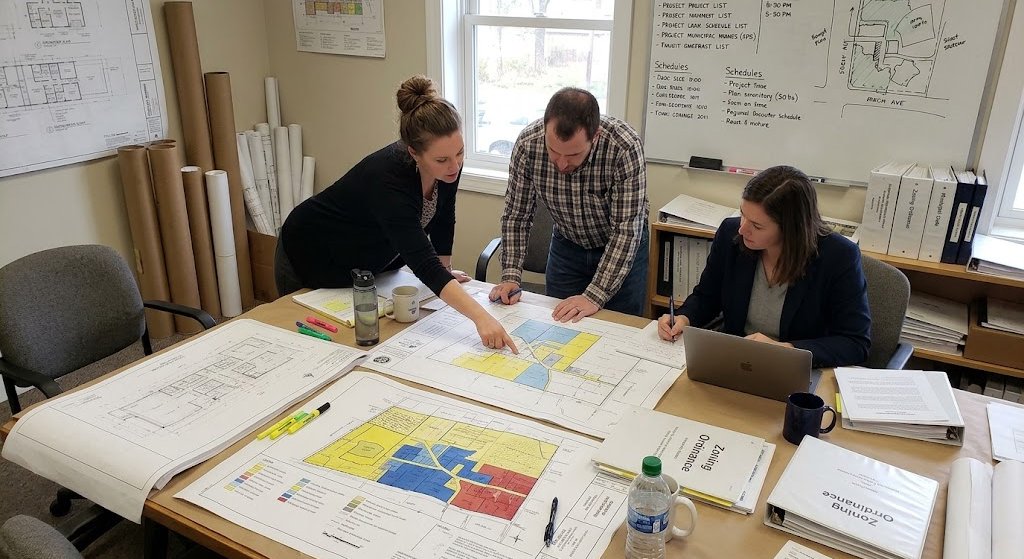

If you are building, remodeling, or managing a project in Austin, inspections are part of the process. You cannot close a permit without them. You also cannot move forward to the next stage of work without approval from the City.
In the past, many contractors relied on phone calls to request inspections. Now, most inspection scheduling happens online through the City of Austin’s updated system. If you are new to it, the process may feel confusing at first. However, once you understand the steps, it becomes routine.
This guide explains how inspection scheduling works on the new City of Austin website. It focuses on practical steps. It also explains common problems and how to avoid delays.
What This Guide Will Cover
This blog walks through the early stage of the inspection process. Specifically, it covers:
What inspections are and why they matter
Who can schedule inspections in Austin
How the City of Austin’s online system works
What you need before scheduling
Key terms you should understand
Later sections will go step by step through the actual scheduling process. The goal is simple: help you avoid rejected requests, missed inspections, and costly delays.
If you manage multiple permits or large-scale development projects, staying organized is critical. Even small errors in inspection requests can slow down construction timelines. That is why understanding the system matters.
Why Inspections Matter for Your Permit
Every active building permit in Austin requires inspections. These inspections confirm that work meets local building codes, safety standards, and approved plans.
Inspections protect:
Occupants
Property owners
Contractors
Future buyers
The public
Without inspection approval, you cannot finalize a permit. Here are some common inspection types tied to permits:
| Inspection Type | When It Happens | Why It Matters |
|---|---|---|
| Foundation Inspection | Before concrete is poured | Confirms structural base meets approved plans |
| Framing Inspection | Before drywall | Ensures structure is safe and code compliant |
| Electrical Inspection | Before covering wiring | Verifies safe installation |
| Plumbing Inspection | Before walls are closed | Confirms proper pipe installation |
| Final Inspection | At project completion | Required to close permit |
If an inspection fails, work may need correction. That means additional labor, material costs, and schedule changes. Therefore, scheduling inspections at the correct stage of construction is critical.
In short, inspections are not just a formality. They are required checkpoints in your construction timeline.
The City of Austin’s Digital System for Inspection Scheduling
The City of Austin now uses an online platform for permits and inspections. Most scheduling happens through the Austin Build + Connect portal, often called AB+C.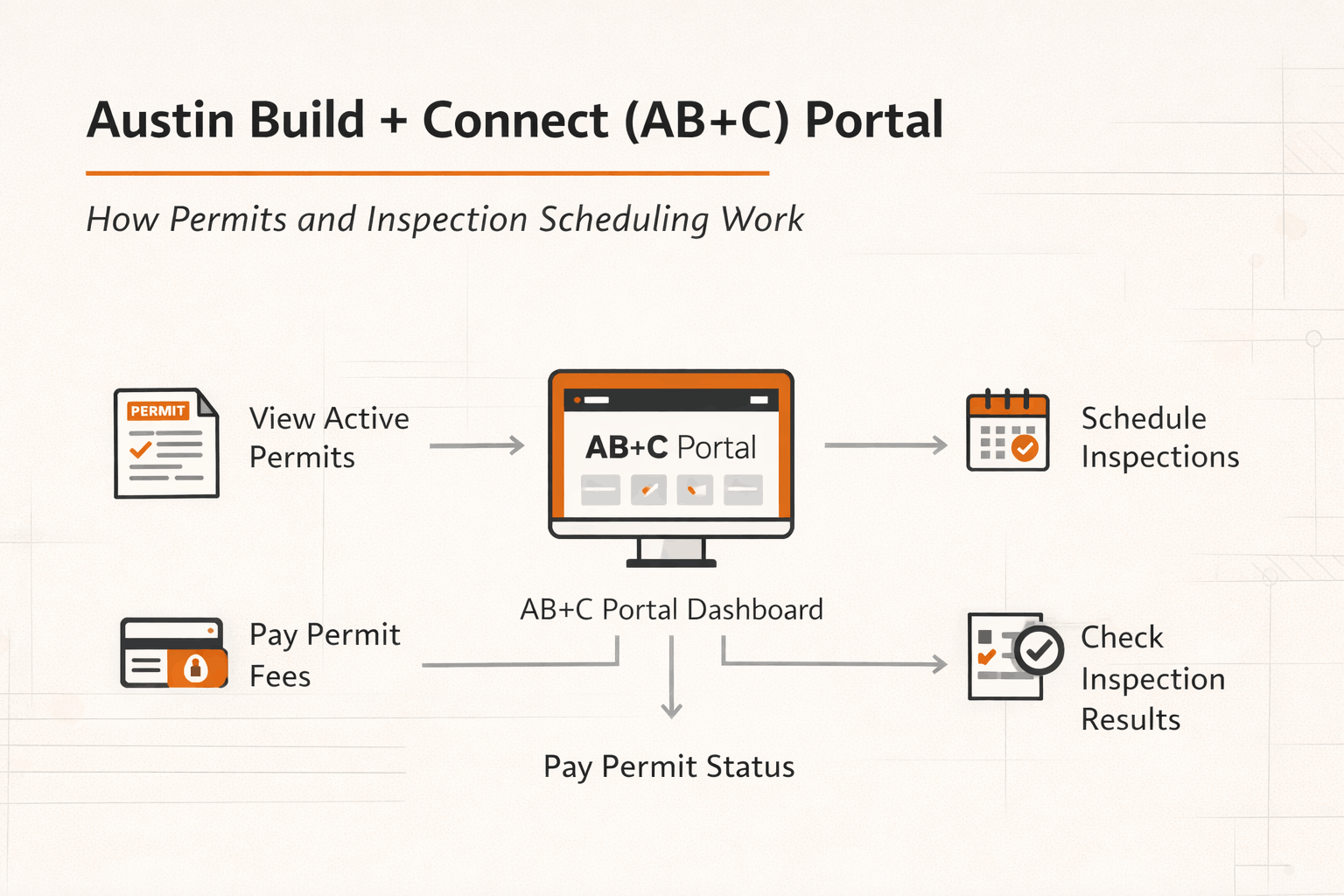
This system allows users to:
View active permits
Pay permit fees
Request inspections
Check inspection results
Review status updates
The shift to an online system has improved tracking and recordkeeping. You can now see inspection history tied directly to your permit number. That makes documentation easier for contractors and developers managing multiple projects.
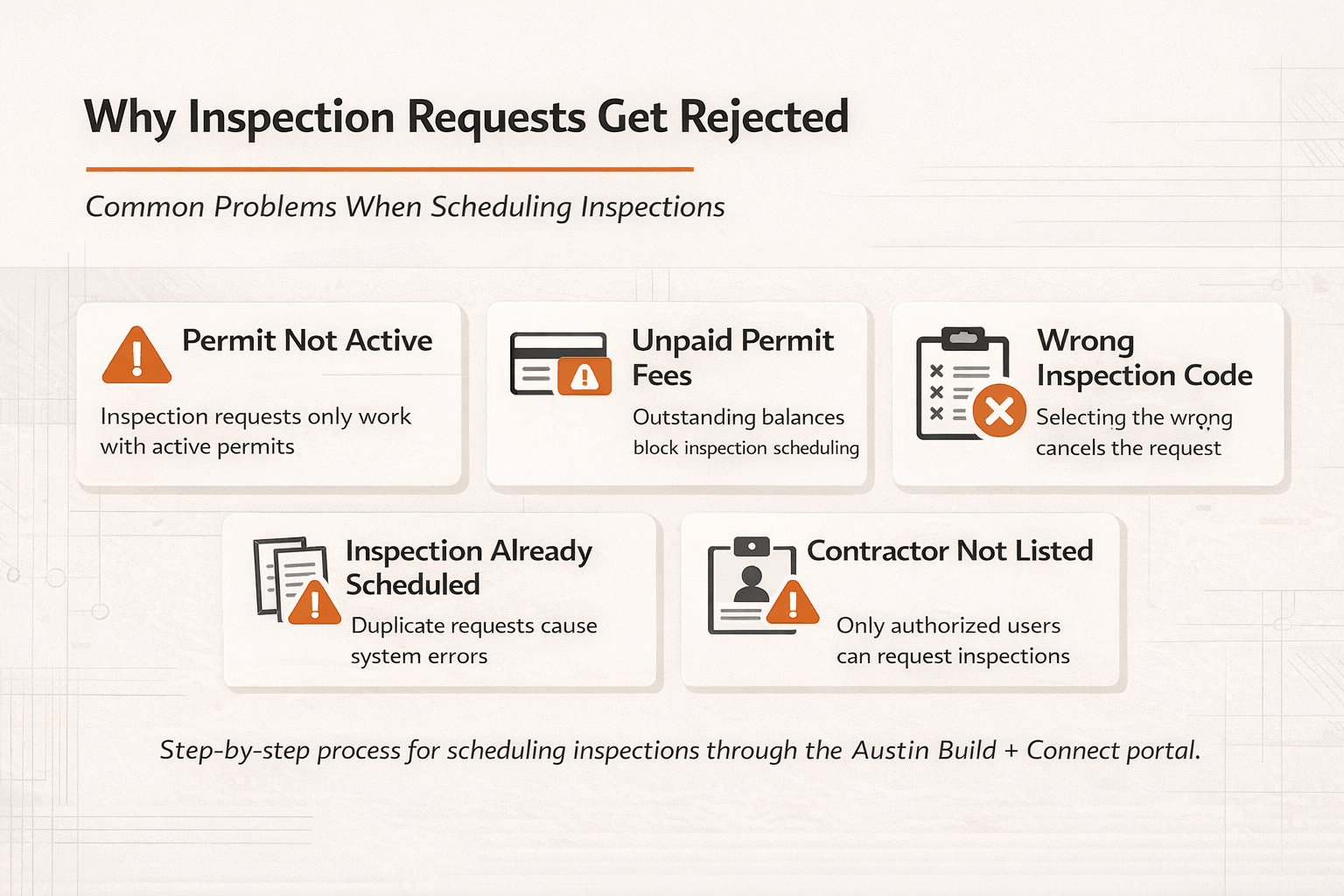
However, many people struggle with the system at first. Common issues include:
Permits not linked to accounts
Inspection types not appearing
Requests blocked due to unpaid fees
Incorrect inspection codes
These problems are avoidable. In most cases, the issue relates to permit status or account setup. Understanding how the system works before you submit a request saves time and prevents frustration.
Table of Contents
Overview of the City of Austin’s Inspection System
Before scheduling an inspection, you need to understand how the system is structured. Not all inspections are scheduled the same way. Also, not all users have the same access rights.
Let’s break it down clearly.
What Is the Austin Build + Connect (AB+C) Portal?
The Austin Build + Connect portal is the City’s online permitting and inspection platform.
It connects your permit record to:
Inspection scheduling
Plan review updates
Fee payments
Status tracking
Every permit has a unique permit number. That number is central to scheduling inspections. If you do not have a valid permit number, you cannot request an inspection.
To use the system, you must:
Create an account
Log in
Link your permit (if not automatically connected)
If your permit is active and fees are paid, inspections become available for scheduling. Here is a quick overview:
| Requirement | Why It Matters |
|---|---|
| Active Permit | Only active permits allow inspection requests |
| Paid Fees | Outstanding balances may block scheduling |
| Correct Permit Type | Inspection options depend on permit category |
| Account Access | You must be listed or authorized |
If one of these items is missing, the system may not show inspection options.
Types of Inspections You Can Schedule in Austin
Austin has multiple inspection categories. The inspection type depends on your permit. Common categories include:
Building inspections
Electrical inspections
Mechanical inspections
Plumbing inspections
Trade-specific inspections
Site inspections
For example, a residential remodel may require:
Rough framing inspection
Rough electrical inspection
Insulation inspection
Final building inspection
A commercial development may involve:
Structural steel inspection
Fire protection inspection
Accessibility compliance inspection
Site utility inspection
Each inspection has a code attached to it. Selecting the correct code is important. Choosing the wrong inspection type can result in a failed visit or cancellation.
If you are unsure which inspection applies, review your approved permit documents. The inspection sequence is usually outlined there.
Who Can Schedule an Inspection in Austin?
Not everyone can request inspections. Access depends on how the permit is set up. Typically, the following parties can schedule inspections:
General contractors listed on the permit
Licensed trade contractors attached to the permit
Homeowners (if they pulled the permit)
Authorized agents
If you are not listed on the permit, the system may block you from scheduling. In some cases, contractors need to coordinate internally. For example:
The electrician schedules electrical inspections
The plumber schedules plumbing inspections
The general contractor schedules building inspections
Clear communication between trades helps prevent double bookings or missed inspections. Before attempting to schedule, confirm:
Your name or company is listed on the permit
The permit status is active
All required fees are paid
These simple checks can prevent most scheduling problems.
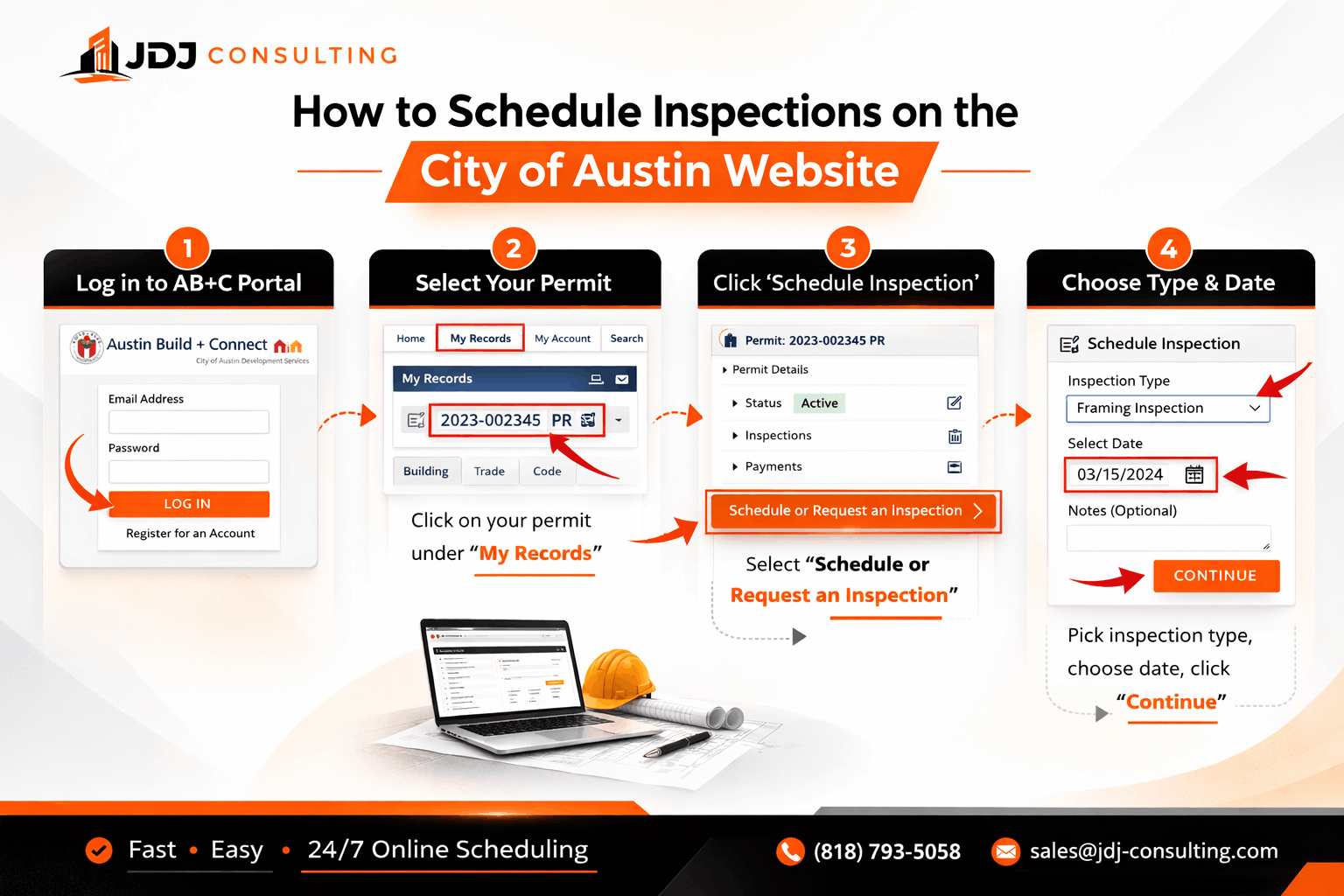
Step-by-Step: How to Schedule Inspections on the New City of Austin Website
Once your permit is active and your account is set up, scheduling an inspection becomes straightforward. Still, small mistakes can cause delays. So it helps to follow a clear process.
Below is a practical step-by-step breakdown based on how the City of Austin’s online system works today.
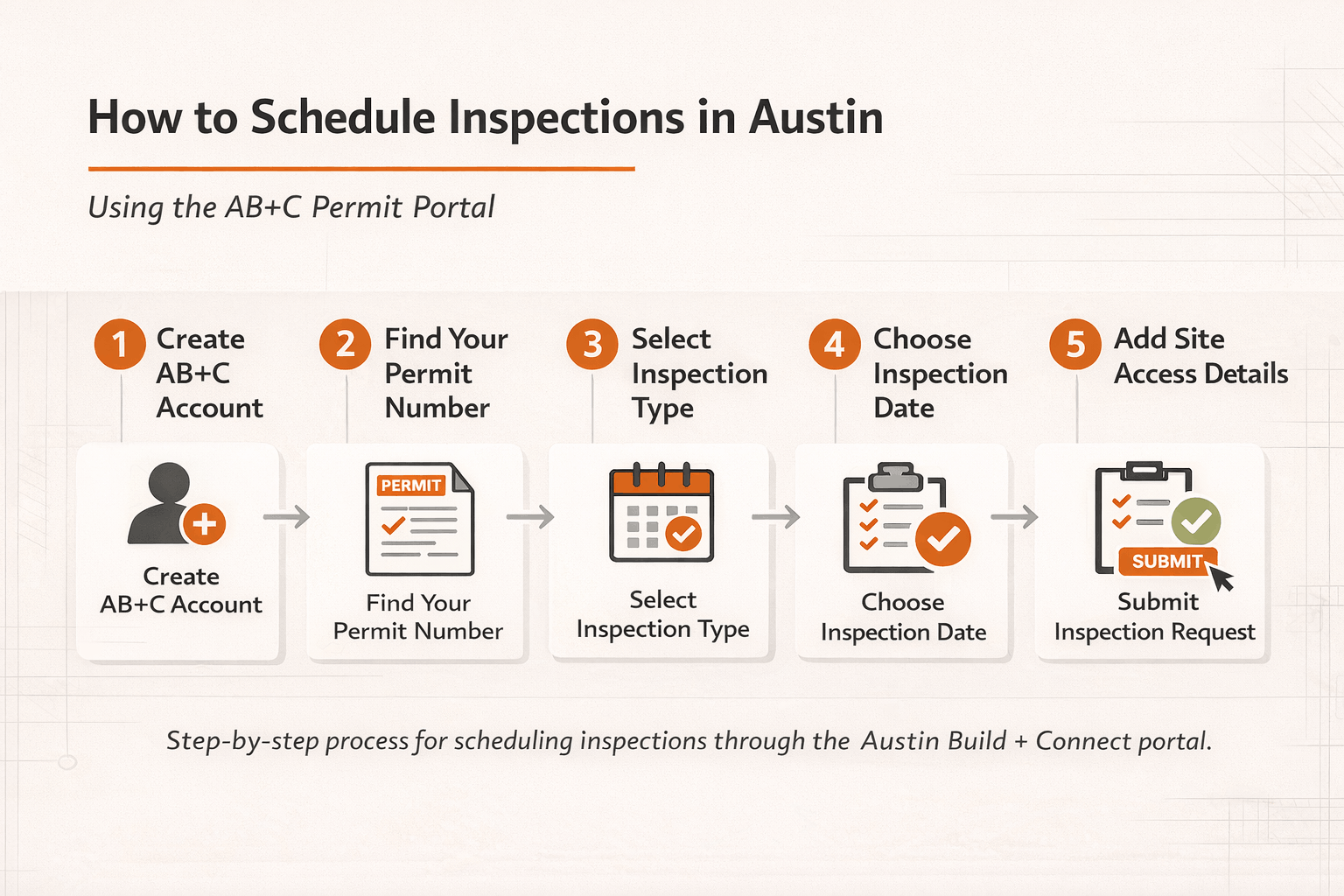
Step 1: Create and Set Up Your AB+C Account
If you do not already have an account, you must register first.
Go to the City of Austin permit portal and create a user profile. Use your business email if you are a contractor. That makes tracking easier across multiple projects.
During setup:
Enter your full legal name
Add your company name (if applicable)
Include your license number (for trade contractors)
Verify your email
After creating the account, log in.
Next, confirm that your permit appears in your dashboard. In many cases, the permit automatically connects if your email matches the contractor listed on the application.
If it does not appear, you may need to:
Search by permit number
Request access to the permit record
Confirm you are listed correctly
Without access to the permit, you cannot request inspections. Before moving to the next step, double-check the following:
| Item to Confirm | Where to Check | Why It Matters |
|---|---|---|
| Permit Status | Permit summary page | Must show “Active” |
| Fees Paid | Payment section | Unpaid fees block requests |
| Correct Contractor Listed | Permit details | Access depends on listing |
| Inspection Stage Ready | Construction progress | Prevents failed inspections |
These checks take only a few minutes. However, they prevent days of delay.
Step 2: Log In and Locate Your Permit
After signing in, go to your dashboard.
Most users will see:
My Records
My Permits
Inspections
Payments
Click on your permit number. This opens the permit detail page.
Here, you can review:
Permit type
Project address
Current status
Inspection history
Available inspection types
If your permit does not show inspection options, one of three things is likely happening:
The permit is not active
Fees are still due
The system has not updated yet
In some cases, recently issued permits take a short time to appear fully in the inspection system. If everything looks correct, continue to inspection scheduling.
Step 3: Select the Correct Inspection Type
Inside the permit page, look for the inspection request section. This is often labeled clearly. You will see a list of inspection types tied to your permit.
Choose carefully.
Each inspection has a code and description. For example:
Rough Framing
Rough Electrical
Plumbing Top-Out
Mechanical Rough
Final Building
Selecting the wrong inspection can result in:
Inspector unable to perform the visit
Failed inspection
Need to reschedule
If you are unsure which inspection to request, check:
Your approved construction plans
Your inspection card
Notes from prior inspections
Here is a simple reference example:
| Construction Stage | Likely Inspection Needed |
|---|---|
| Foundation forms ready | Foundation inspection |
| Framing complete | Rough framing |
| Wiring installed | Rough electrical |
| All work complete | Final inspection |
Always schedule inspections only when the work is fully ready. Inspectors will not partially inspect incomplete work.
Step 4: Choose the Inspection Date
After selecting the inspection type, you will be prompted to choose a date. The system typically allows next-business-day scheduling if requested before the daily cutoff time.
Keep these best practices in mind:
Do not schedule until work is complete
Ensure access to the site is available
Make sure someone responsible can answer inspector questions
Avoid scheduling multiple trades on the same day unless fully coordinated
Inspection time windows are usually broad. You may receive a general window rather than an exact time. Plan your crew schedule accordingly. If your project requires coordination between trades, confirm readiness before booking multiple inspections. This prevents repeat visits.
Step 5: Add Notes for the Inspector (If Needed)
There is often a comments section. Use it wisely. Helpful information may include:
Gate codes
Lockbox details
Special access instructions
On-site contact phone number
Keep notes short and clear. Avoid unnecessary details. This small step can prevent missed inspections.
Step 6: Submit and Confirm the Inspection Request
After reviewing the details, submit the request. You should receive confirmation on the screen. Many users also receive email confirmation.
Before logging out, confirm:
Correct inspection type
Correct address
Correct date
No error messages
If the system displays an error, read it carefully. Common messages include:
Permit not eligible
Inspection already scheduled
Outstanding fees
Most system errors relate to permit status or duplicate scheduling. If confirmation appears successfully, your inspection is now scheduled.
What Happens After You Schedule an Inspection
Scheduling is only part of the process. Preparation determines whether the inspection passes.
Confirmation and Tracking
After scheduling, you can monitor inspection status in your permit dashboard. You may see statuses such as:
Scheduled
Completed
Passed
Failed
Partial Pass
Results are usually posted after the inspection is complete. Make it a habit to check results the same day. This keeps your project moving.
Inspection Day: What to Expect
On inspection day:
Ensure the work area is clear
Provide safe access
Have approved plans available
Ensure responsible personnel are reachable
Inspectors verify compliance with the approved permit and building codes. They may take notes or photos. If everything meets requirements, the inspection will pass.
If issues are found, you will receive comments explaining corrections.
Understanding Pass, Partial, and Fail Results
Inspection outcomes generally fall into three categories:
| Result | Meaning | Next Step |
|---|---|---|
| Pass | Work approved | Move to next stage |
| Partial | Some items approved | Correct remaining items |
| Fail | Work not approved | Correct and reschedule |
Do not panic if you receive a failed inspection. It is common during construction.
Instead:
Review comments carefully
Complete required corrections
Schedule a reinspection
Respond quickly. Delays in reinspection can slow your entire project timeline.
Rescheduling or Canceling an Inspection
Sometimes plans change. Work may not be ready. If needed, cancel or reschedule as early as possible through the portal. Late cancellations may cause delays or require additional coordination. Always communicate with your team before canceling. Make sure all trades stay aligned.
Common Issues When Scheduling Inspections in Austin (And How to Fix Them)
Even experienced contractors run into system problems. Most issues are not serious. However, they can delay your project if you do not address them quickly. Below are the most common inspection scheduling problems in Austin and what you can do about them.
My Inspection Option Is Not Showing
This is one of the most frequent complaints. You log in. You open your permit. But there is no inspection option available.
In most cases, the issue is one of the following:
The permit is not active
Fees are still unpaid
You are not listed on the permit
The inspection stage is not yet eligible
The permit was issued very recently
Start by checking the permit status. If it does not say Active, you cannot request inspections. Next, check the payment tab. Even a small outstanding balance can block scheduling. If everything looks correct but the inspection type still does not appear, verify that you are listed correctly as the contractor or authorized agent.
Sometimes administrative updates take time to reflect in the system. If the permit was issued today, give the system time to update before assuming there is an error.
The System Shows an Error Message
When submitting an inspection request, you may see an error notice. Common messages include:
“Permit not eligible for inspection”
“Inspection already scheduled”
“Outstanding balance due”
“Invalid inspection code”
Each message points to a specific issue. Here is a quick reference:
| Error Message | Likely Cause | Solution |
|---|---|---|
| Permit not eligible | Permit inactive | Confirm permit status |
| Outstanding balance | Fees unpaid | Pay remaining fees |
| Inspection already scheduled | Duplicate request | Check inspection history |
| Invalid inspection code | Wrong inspection selected | Review permit inspection list |
Read the error carefully. Do not guess. Most problems can be resolved in minutes once identified.
Inspector Arrived, but Work Was Not Ready
This is not a system issue, but it is common. Sometimes crews schedule inspections too early. For example:
Wiring not fully installed
Framing incomplete
Required documents missing
Work area blocked
If the inspector cannot complete the inspection, it may result in a failed visit. That means rescheduling and possible delays.
To avoid this:
Walk the site before requesting inspection
Confirm all trades are finished
Ensure access is clear
Have approved plans on site
Small preparation steps prevent unnecessary reinspections.
Inspection Failed — What Now?
A failed inspection does not mean your project is in trouble. It simply means corrections are needed. When you receive a failed result:
Review the inspector’s notes carefully
Share comments with the responsible trade
Complete corrections
Schedule reinspection
Avoid guessing what the inspector meant. If something is unclear, contact the department for clarification. Correct the issue fully before scheduling again. Repeated failures slow projects and can affect contractor reputation.
Tips to Avoid Inspection Delays on Austin Projects
Inspection delays affect budgets and timelines. Developers and contractors working on multiple projects must stay organized. Here are practical tips that help keep projects moving.
Schedule at the Right Time
Do not rush to schedule inspections just to stay ahead.
Instead:
Confirm work is 100% complete for that stage
Verify coordination between trades
Make sure no last-minute changes are pending
Rushing often causes more delay than waiting one extra day.
Keep Your Permit Records Organized
For contractors managing multiple permits, organization matters. Maintain a simple internal tracking system that includes:
Permit number
Address
Inspection stage
Scheduled date
Result
Notes
Here is a simple example format:
| Permit # | Address | Inspection Type | Scheduled Date | Status | Notes |
|---|---|---|---|---|---|
| 2024-00123 | 123 Main St | Rough Electrical | March 5 | Scheduled | Waiting on panel install |
| 2024-00456 | 456 Oak Ave | Framing | March 6 | Passed | Move to insulation |
A basic tracking sheet prevents missed inspections and confusion across teams.
Communicate Clearly With Trades
Inspection scheduling often breaks down due to poor coordination.
For example:
Electrician schedules rough inspection
Framing is not complete
Inspector fails the visit
Before scheduling, confirm with all trades involved. A short call or text can prevent costly delays.
Use the Notes Section Properly
If your site has:
Gate codes
Limited access
Lockboxes
Special safety requirements
Include that information clearly in the notes section. Inspectors manage full schedules. Clear instructions reduce missed visits.
Monitor Inspection Results the Same Day
Do not wait several days to check results. Log in and review inspection outcomes as soon as they are posted. If corrections are required, act immediately. Fast response keeps your project on track.
When to Contact the City of Austin for Help
Most scheduling issues can be resolved online. However, sometimes direct communication is necessary. Contact the City if:
The permit shows active, but inspections are unavailable
The system repeatedly gives errors
Inspection results seem incorrect
You need clarification on correction notes
Before calling or emailing, gather:
Permit number
Property address
Inspection type
Screenshot of error (if possible)
Providing complete information speeds up assistance. Be clear and professional in communication. City staff handle many requests daily. Clear details help them help you.
Final Thoughts on Scheduling Inspections in Austin
Scheduling inspections through the City of Austin’s online system is now standard practice. While the portal may feel complex at first, the process becomes routine once you understand it.
The key points to remember are simple:
Make sure your permit is active
Confirm all fees are paid
Choose the correct inspection type
Schedule only when work is ready
Check results promptly
Most delays happen because of small oversights. Careful preparation and clear communication prevent them. For contractors and developers managing projects across Austin, staying organized is critical. Inspection scheduling is not just an administrative task. It directly affects timelines, budgets, and client satisfaction.
If your team needs help coordinating permits, inspections, or compliance in Austin, professional guidance can keep your project moving smoothly.
FAQs About How to Schedule Inspections on New City of Austin Website
Many contractors and property owners run into the same questions. Below are clear answers to help you avoid confusion and delays.
Can I Schedule an Inspection Without Being Listed on the Permit?
No. The inspection scheduling system only allows requests from users connected to the permit. This usually includes:
The general contractor
Licensed trade contractors
The permit holder
An authorized agent
If your name is not listed on the permit record, the system may block the request. In that case, the contractor or permit holder must add you to the permit before you can schedule inspections.
What Should I Do If My Permit Does Not Appear in My Account?
Sometimes permits do not automatically appear in the AB+C portal after account creation.
To fix this:
Search using the permit number
Check that your email matches the contractor listed on the permit
Request access to the permit record if needed
If the permit still does not appear, contact the Building Division for assistance. Access to the permit is required before submitting inspection requests.
What Is an Inspection Code and Why Is It Important?
Each inspection in the system is tied to a specific inspection code. This code tells the City which building inspection the inspector should perform.
For example, codes may exist for:
Rough framing
Electrical rough-in
Plumbing top-out
Final building inspection
Selecting the wrong code can delay the inspection process. This is because the inspector may arrive expecting a different stage of work.
Do All Construction Projects Require Site Inspections?
Most projects with active permits require at least one site inspection. The number of inspections depends on the scope of construction work.
Common examples include:
Foundation inspection
Framing inspection
Electrical inspection
Final building inspection
These inspections confirm that work follows approved plans and local building code requirements.
Can Inspection Results Affect My Permit Status?
Yes. Inspection results directly affect the status of your permit.
If inspections pass, the project can move forward to the next stage. However, failed inspections may require corrections before work continues.
For example:
Failed rough inspection → corrections required
Reinspection scheduled
Work approved after corrections
Tracking inspection results regularly helps keep the project timeline on schedule.
Do Commercial Projects Require Additional Inspections?
Yes. Larger projects often require additional building inspections and specialty reviews.
Examples may include:
Structural inspections
Accessibility compliance inspections
Fire inspections reviewed by the Fire Marshal
Site utility inspections
Commercial permits often involve multiple trades and departments. Because of this, inspection scheduling may require coordination between contractors and city staff.
Can Multiple Contractors Submit Inspection Requests for the Same Permit?
Yes. In many projects, different trades handle their own inspection requests.
For example:
Electricians schedule electrical inspections
Plumbers schedule plumbing inspections
General contractors schedule structural building inspections
Good communication between trades helps avoid duplicate inspections. It keeps the inspection scheduling process organized.
Where Should I Add Access Information When Scheduling an Inspection?
When you schedule inspections in the AB+C Portal, there is a comments text box where you can add site access details.
Useful information includes:
Gate code for secured properties
Access code for entry systems
Location of a lock box with keys
The on-site contact name and phone number
How Can I Track My Inspections After Scheduling?
After you submit a request, you can track progress in the My Inspections section of the AB+C Portal.
Inside the system, you can:
View upcoming inspections
Check inspection results
Review inspector comments
Confirm inspection history for your active permits
Checking My Permits and inspection results regularly helps you respond quickly if corrections are required.
Can I Request Next-Day Building Inspections in Austin?
Yes. In many cases, next-day building inspections are available if the request is submitted before the daily cutoff time.
However, availability depends on:
Inspection demand
Permit status
Inspector availability
Most scheduling occurs Monday through Friday, so planning ahead is important. Submitting requests early in the day improves your chances of getting the next available inspection date.
What Happens If the Inspector Cannot Access the Job Site?
If an inspector cannot access the property, the inspection may be marked incomplete.
Common access issues include:
Missing gate code or incorrect access code
Locked entry without a lock box
No on-site contact available
To avoid delays, always include clear access instructions in the inspection request. This small step can prevent rescheduling and project slowdowns.
Which City Department Handles Most Building Inspections in Austin?
Most building inspections are managed by the City’s Building Division. Inspectors review work to confirm it follows approved plans and building code requirements.
Depending on the project, other departments may also review work, including:
The Fire Marshal for Fire Code compliance
Other city departments for specialized inspections
What Happens If My Inspection Request Is Submitted Too Early?
If work is not ready when the inspector arrives, the visit may result in a failed inspection.
For example:
Framing incomplete
Electrical wiring not finished
Required documents missing
When this happens, you must correct the issue and submit a new inspection request through the system. Scheduling inspections only when work is complete helps avoid delays.
Do I Need a Permit Before Scheduling an Inspection?
Yes. You cannot schedule an inspection without an active permit. The permit must:
Be approved and issued
Show an “Active” status
Have all required fees paid
If your permit is still under review, inspection options will not appear. Always confirm permit issuance before trying to book an inspection.
How Far in Advance Can I Schedule an Inspection?
Most inspections can be scheduled for the next business day if requested before the daily cutoff time.
However:
High-demand periods may fill quickly
Large commercial projects may require coordination
Special inspections may require advance planning
If your project timeline is tight, schedule as soon as work is ready. Avoid waiting until the last minute. Inspection availability can impact your construction schedule.
Can I Cancel or Reschedule an Inspection?
Yes. You can cancel or reschedule through the online portal. It is best to make changes as early as possible. Last-minute cancellations can create delays for your project and others.
Before canceling:
Confirm with all trades
Make sure work truly is not ready
Check the system for the next available date
Clear communication helps prevent unnecessary rebooking.
What Time Will the Inspector Arrive?
Inspection windows are typically broad. You may receive a general time range instead of a specific appointment time. Inspectors manage multiple visits per day, so exact arrival times are not guaranteed.
Plan for flexibility. Make sure:
The site is accessible
A responsible contact is reachable
All required work is visible
Being prepared reduces the risk of missed inspections.
What Happens If I Miss My Inspection?
If the inspector cannot access the site or the work is not ready, the visit may be marked failed or incomplete. You will then need to:
Correct the issue
Reschedule the inspection
Missed inspections can slow down your timeline. In some cases, repeated issues may draw additional review. Always confirm site readiness before scheduling.
How Do I Prepare for a Final Inspection?
Final inspections close out your permit. Preparation is critical. Before requesting a final inspection:
Confirm all prior inspections passed
Complete all construction work
Remove debris
Ensure safety features are installed
Verify all required documents are on site
If your project includes multiple trades, confirm each trade has completed its work and passed required inspections. A failed final inspection can delay certificate approvals and project completion.
Inspection Best Practices for Contractors and Developers
Beyond scheduling, project management plays a major role in inspection success. Below are strategies that experienced builders use to reduce inspection delays.
Build Inspection Time Into Your Schedule
Inspection approvals are checkpoints. They are not optional. When building your project timeline:
Account for inspection lead time
Allow time for possible corrections
Avoid stacking inspections too tightly
Construction schedules that ignore inspection timing often experience unnecessary stress.
Keep Clear Internal Communication
On larger projects, multiple people may be involved:
Project managers
Site supervisors
Trade contractors
Administrative staff
Everyone should know:
Which inspections are scheduled
When they are scheduled
What stage the project is in
Clear communication prevents duplicate bookings and missed visits.
Maintain Documentation
Keep organized records of:
Permit numbers
Inspection results
Correction notices
Reinspection dates
Documentation helps if questions arise later. It also supports smoother project closeout.
Review Correction Notes Carefully
If an inspection fails, do not rush to reschedule.
Instead:
Read every comment
Confirm understanding
Make complete corrections
Partial fixes often lead to repeated failures. Careful review saves time and money.
Closing Thoughts: Keeping Your Austin Project Moving Forward
Scheduling inspections on the City of Austin website is now a standard part of construction management. At first, the system may seem detailed. However, once you understand the structure, the process becomes consistent.
Success depends on a few simple principles:
Verify permit status
Pay required fees
Select the correct inspection
Schedule only when work is ready
Monitor results immediately
These habits reduce stress and prevent delays.
Need Help With Austin Inspections?
Inspection scheduling can slow your project down if not handled properly. If you’re dealing with permit issues, failed inspections, or portal confusion, JDJ Consulting can help. We support contractors and developers with:
Permit coordination
Inspection scheduling
Correction responses
Compliance support
Let’s keep your project moving.
- Phone: (818) 793-5058
- Email: sales@jdj-consulting.com