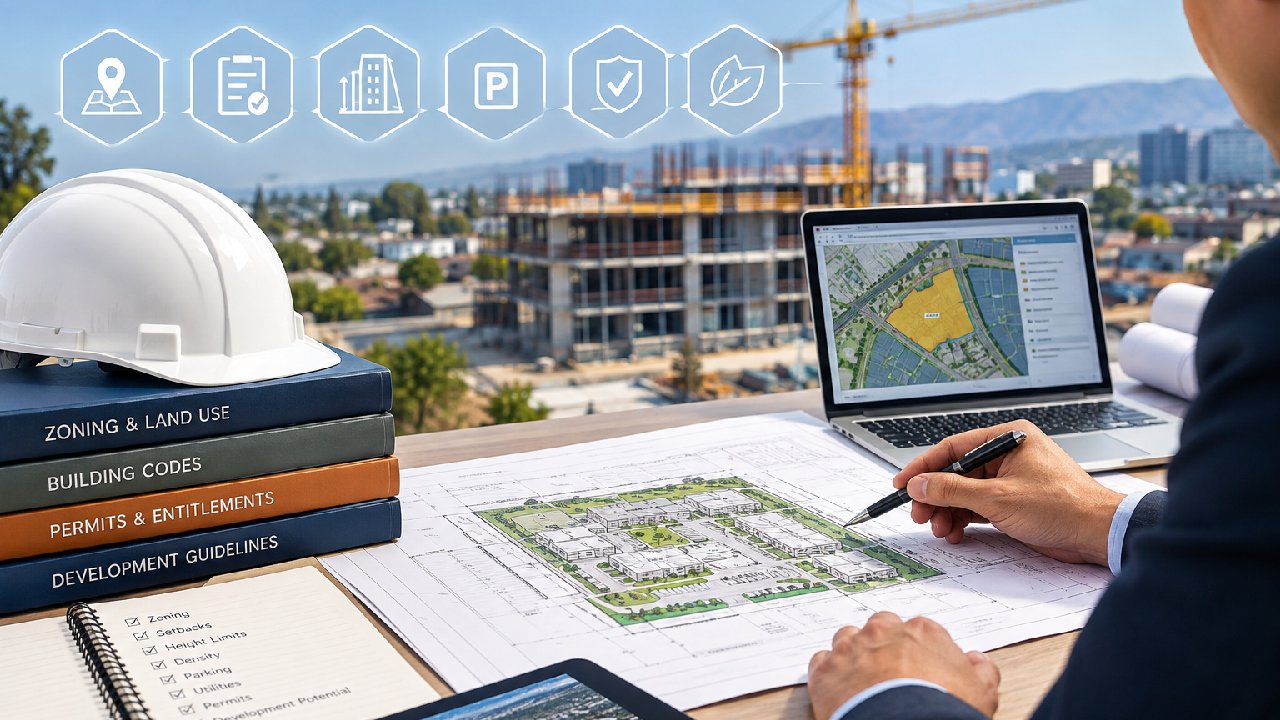

Permitting is one of the slowest parts of any construction project. It often delays projects more than design or financing. Even experienced developers run into issues.
The reason is simple. The process is not built for speed. It involves many steps, many people, and many systems that do not talk to each other.
If you are working in cities like Austin, Miami, or Los Angeles, it gets even harder. Each city has its own rules. Each department has its own process. Because of this, even a small mistake can delay a project for weeks.
That is why many developers now look for better ways to manage permits. Before we get there, it helps to understand how the traditional process works.
The traditional permitting process explained (simple breakdown)
At a basic level, permitting means getting approval to build. But the steps are rarely simple.
Most projects follow a process like this:
Plans are prepared by architects and engineers
Documents are submitted to city departments
Reviewers check for code and zoning compliance
Comments are issued
Revisions are made and resubmitted
Final approval is granted
On paper, this looks manageable. In reality, it is not. Most of this process is still manual. Teams rely on emails, PDFs, and phone calls. There is no single place to track everything.
Because of that, people spend a lot of time asking simple questions:
Has the permit been reviewed?
Who has it right now?
What comments are still open?
These gaps slow things down. They also create confusion across the team.
Why do delays happen in permitting workflows?
Permitting delays do not happen for one reason. They usually come from several small issues that build up over time.
Here are the most common causes:
Disconnected systems: Different departments use different tools. Nothing is fully linked.
Incomplete submissions: Missing details lead to review comments and resubmissions.
Poor communication: Without regular follow-up, applications sit longer than expected.
Changing rules: Zoning and city requirements can shift during a project.
High volume of applications: Busy cities process thousands of permits at once.
Even one of these can slow a project. When two or three things happen together, delays become unavoidable.
Here is a simple breakdown:
| Delay Factor | What Happens | Result |
|---|---|---|
| Incomplete documents | Plans get rejected or flagged | Rework and delays |
| No follow-up | Application sits in queue | Lost time |
| Multiple departments | Reviews happen in stages | Longer timeline |
| Manual tracking | Status is unclear | Confusion |
| Rule changes | Plans must be updated | Extra work |
As you can see, most problems are not technical. They are process-related.
How permitting delays impact project timelines and costs
Permitting delays affect more than just time. They impact the entire project.
First, there are holding costs. You still pay for land, loans, and planning while waiting for approval. Second, delays disrupt schedules. Contractors and teams may need to shift timelines or take on other work. Third, market timing becomes a risk. A delayed project may miss the right moment to launch or sell.
Here is how these delays play out:
Higher financing costs due to longer timelines
Delays in starting construction
Missed deadlines for investors or partners
Increased pressure on project teams
A quick summary:
| Impact Area | What Changes | Long-Term Effect |
|---|---|---|
| Costs | More interest and overhead | Lower profit |
| Timeline | Slower approvals | Project delays |
| Team planning | Scheduling conflicts | Inefficiency |
| Market timing | Late project delivery | Missed opportunities |
Because of this, developers are now focused on reducing risk early. Permitting is one of the first areas they try to improve.
Table of Contents
What Is Autodesk Construction Cloud and Why It Matters
As projects grow more complex, teams need better systems. Many now use Autodesk Construction Cloud to keep everything organized. Instead of using separate tools, this platform brings project data into one place. That makes it easier to manage work from start to finish.

Overview of Autodesk Construction Cloud (ACC)
Autodesk Construction Cloud, or ACC, is a cloud-based platform for construction teams.
It connects different parts of a project, including:
Design
Planning
Construction
Documentation
Everything is stored in one system. That means teams do not have to search through emails or folders. Because it is cloud-based, everyone sees the same information. This reduces confusion and keeps teams aligned.
Key features developers and contractors use
Most teams use ACC for a few key functions.
These include:
Document management: All plans and files are stored in one place.
Project tracking: Teams can see progress and updates in real time.
Team collaboration: Comments and changes are shared directly in the system.
Issue tracking: Problems are logged and resolved quickly.
Integrations: The platform connects with other tools.
These features help reduce manual work. They also make communication easier.
The problem with disconnected tools in construction
Even with platforms like ACC, many teams still use separate tools for different tasks. Permitting is often handled outside the main system. This creates problems.
Teams switch between tools. Information gets lost. Updates are missed. For example, a team may manage design in ACC but track permits in spreadsheets. This split leads to confusion.
Here is a simple comparison:
| Workflow Area | Disconnected Tools | Integrated System |
|---|---|---|
| Documents | Stored in many places | One central system |
| Communication | Emails and calls | In-platform updates |
| Permit tracking | Manual sheets | Live tracking |
| Accuracy | Prone to mistakes | More reliable |
| Coordination | Fragmented | Aligned |
When systems are connected, projects run smoother. When they are not, delays increase.
What is PermitFlow and How Does it Work
While Autodesk manages project data, it does not fully handle permits. That is where PermitFlow comes in. PermitFlow focuses only on permitting. It helps reduce manual work and keeps the process organized.
Core functionality of PermitFlow
PermitFlow is built to handle the full permit process.
It helps with:
Finding permit requirements
Preparing applications
Submitting documents
Tracking approvals
Instead of doing each step manually, teams can manage everything in one workflow.
How permit automation actually works (step-by-step)
Here is how a typical process works with automation:
Project details are added
The system identifies required permits
Applications are created automatically
Submissions are sent to agencies
Progress is tracked in real time
This reduces repetitive work. It also keeps everything organized.
Why are developers shifting to permit automation
More developers are using automation because the old process is slow.
Here are the main reasons:
Faster approvals
Fewer errors
Better tracking
Less manual work
At the same time, technology does not replace expertise. Complex projects still need professionals who understand zoning, city rules, and approvals.
The best results come from using both:
Technology for speed
Experts for strategy and follow-up
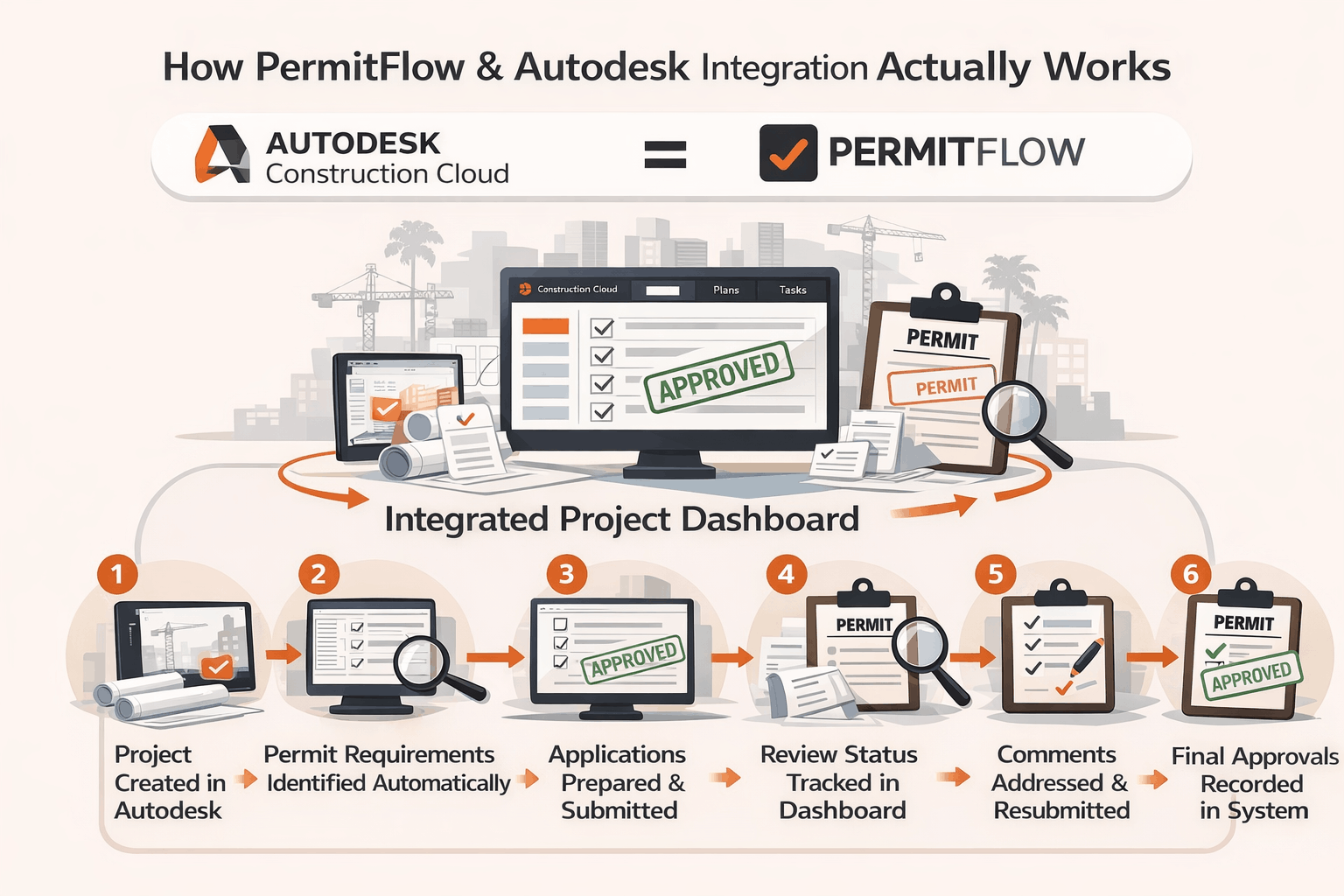
How PermitFlow & Autodesk Integration Actually Works
Bringing permits into the same system as your project changes how teams work. Instead of switching between tools, everything stays connected.
When PermitFlow is integrated with Autodesk Construction Cloud, permit data becomes part of the overall project workflow. That means fewer gaps, fewer emails, and better visibility.
Let’s break it down in simple terms.
What the integration does (simple explanation)
The integration connects two key parts of a project:
Project management (Autodesk)
Permitting workflow (PermitFlow)
Instead of handling permits outside the system, you can manage them inside your project dashboard.
This means:
Permit requirements are linked to the project
Applications are created using project data
Status updates are visible in real time
Teams do not need to switch platforms
In short, it keeps everything in one place.
Step-by-step workflow inside the integration
Here is how a typical workflow looks when both systems are connected:
A project is created in Autodesk
Project details are shared with the permit system
Required permits are identified automatically
Applications are prepared and submitted
Review status is tracked inside the dashboard
Comments are addressed and resubmitted
Final approvals are recorded in the system
Each step connects to the next. There is no need to re-enter data or track updates manually.
Key benefits of integrated workflows
When systems are connected, the biggest benefit is clarity. Everyone knows what is happening and what needs attention.
Here are the main advantages:
Centralized data: All information lives in one system
Faster communication: Teams see updates without waiting for emails
Fewer errors: Less manual entry means fewer mistakes
Better tracking: Status updates are visible at all times
Stronger coordination: Teams stay aligned across all stages
To make it clearer, here is a comparison:
| Workflow Step | Separate Systems | Integrated Workflow |
|---|---|---|
| Data entry | Repeated in many tools | Entered once |
| Status tracking | Manual updates | Real-time tracking |
| Communication | Emails and calls | In-system updates |
| Error risk | Higher | Lower |
| Team visibility | Limited | Full visibility |
This kind of setup reduces confusion. It also helps teams respond faster when issues come up.
The Real Benefits of Managing Permits Digitally
Digital permitting is not just about convenience. It has a direct impact on time, cost, and coordination. As projects grow larger, small improvements in workflow can lead to major savings.
Faster approvals and reduced timelines
One of the biggest benefits is speed.
With digital systems:
Applications are prepared faster
Submissions are more complete
Review cycles are shorter
Because information is organized, agencies can review documents more efficiently. This reduces back-and-forth. Also, teams can respond to comments quickly. That keeps the process moving.
Cost savings for developers
Time delays often lead to higher costs. When approvals move faster, costs stay under control.
Digital permitting helps reduce:
Administrative work
Rework from errors
Delays in project start
This leads to better financial planning and fewer surprises.
Better collaboration across stakeholders
Construction projects involve many people:
Developers
Architects
Engineers
Consultants
City agencies
When everyone works in the same system, communication improves. Updates are shared instantly. Files are easy to access. Questions are resolved faster. This reduces confusion and keeps the project moving forward.
Improved visibility and tracking
One of the biggest problems in traditional permitting is the lack of visibility.
Teams often ask:
Where is the permit now?
What comments are still open?
Who needs to respond next?
Digital systems solve this.
They provide:
Real-time status updates
Clear task tracking
Full history of changes
This helps teams make better decisions. It also reduces stress during the approval process.
Where Technology Still Falls Short (And Why Consultants Still Matter)
While digital tools improve efficiency, they do not solve everything. Permitting is not just a process. It involves judgment, relationships, and local knowledge. This is where experienced consultants still play a key role.

Technology cannot replace local expertise
Every city has its own rules. Even within the same state, requirements can vary.
Technology can organize data, but it cannot fully interpret:
Local zoning codes
Department preferences
Unwritten expectations
That knowledge comes from experience.
The complexity of zoning and entitlement approvals
Some approvals go beyond standard permits.
These include:
Zone changes
Variances
Plan amendments
Conditional use permits
These processes require strategy. They often involve hearings, reviews, and negotiations. Technology can support the process, but it cannot manage it alone.
Why human follow-up is still critical
Even with automation, follow-up matters.
Applications still need:
Review coordination
Comment resolution
Direct communication with agencies
Without this, delays can still happen.
That is why the best approach is a combination of both:
Digital tools for efficiency
Expert consultants for execution
How JDJ Consulting Group Bridges the Gap Between Tech and Real-World Approvals
Technology helps organize the process. But it does not replace experience. This is where JDJ Consulting Group adds real value.
JDJ works at the point where systems and real approvals meet. They do not rely only on tools. They combine tools with hands-on coordination, local knowledge, and direct agency communication.
This approach helps move projects forward with fewer delays and fewer surprises.
Combining permit expediting with modern tools
Permit expediting today is not just about paperwork. It is about managing the process from start to finish.
JDJ supports this by:
Using structured workflows to track progress
Keeping documents organized and ready for submission
Following up with agencies at the right time
Responding quickly to review comments
Even when digital tools are used, someone still needs to manage the process. JDJ fills that role. The result is a more controlled and predictable permitting timeline.
Supporting developers across Austin, Miami, and Los Angeles
Each city has its own process. What works in one location may not work in another.
JDJ supports projects in:
Austin
Miami
Los Angeles
This matters because:
Zoning rules vary by city
Review timelines are different
Agency expectations are not the same
JDJ understands these differences. That helps reduce delays caused by incorrect assumptions or incomplete submissions.
JDJ’s role in entitlement strategy and approvals
Before permits even begin, projects often need a clear entitlement strategy.
JDJ helps with:
Understanding what is allowed on a site
Identifying required approvals
Planning the best path forward
Coordinating with agencies and stakeholders
This early planning reduces risk later. It also helps avoid major changes during the permitting stage.
Applying Digital Permitting to Each JDJ Service
Digital tools are most effective when they support real services. JDJ applies these tools across its core offerings. This creates a more connected and efficient workflow from start to finish.
Land-Use & Entitlement Strategy
At this stage, the focus is on approvals and planning.
Digital tools help by:
Organizing zoning data
Tracking required approvals
Keeping records of agency feedback
However, strategy still depends on experience. JDJ uses both data and local knowledge to guide decisions.
Permit Expediting
This is where digital permitting has the biggest impact.
With better systems:
Applications are prepared faster
Submissions are more accurate
Status updates are easier to track
JDJ combines this with active follow-up. That ensures permits do not sit idle in the system.
Due Diligence Consulting
Before a project begins, it is important to understand risks.
Digital tools help gather:
Permit history
Zoning information
Property records
JDJ reviews this information and identifies potential issues early. This helps clients make better decisions.
Feasibility & Highest-and-Best-Use Studies
Feasibility is not just about design. It also depends on approvals.
Digital insights help estimate:
Permit timelines
Approval complexity
Potential delays
JDJ uses this data to guide project planning and investment decisions.
Agency Liaison & Stakeholder Outreach
Even with digital systems, communication remains key.
JDJ supports:
Direct coordination with agencies
Responding to concerns
Keeping stakeholders informed
This human connection helps move approvals forward. It also builds trust, which is often critical in complex projects.
Real-World Example: Traditional vs Digital Permitting Workflow
To understand the difference, it helps to compare both approaches side by side.
Side-by-side comparison table
| Process Stage | Traditional Workflow | Digital + Integrated Workflow |
|---|---|---|
| Application prep | Manual and repetitive | Automated and structured |
| Submission | Email or in-person | Platform-based |
| Tracking | Spreadsheets or calls | Real-time dashboard |
| Communication | Scattered across channels | Centralized in one system |
| Error handling | Delayed and reactive | Faster and more organized |
| Approval timeline | Often unpredictable | More consistent |
Key takeaways from the comparison
There are a few clear differences:
Digital workflows reduce manual work
Teams have better visibility
Communication becomes more organized
Errors are easier to fix early
However, the biggest takeaway is this:
Technology improves the process, but it works best when paired with the right team.
The Future of Permitting: Automation, AI, and Smart Cities
Permitting is starting to change. Cities are slowly moving toward digital systems. At the same time, new tools are improving how projects are managed. This shift will not happen overnight, but the direction is clear.
Rise of AI in construction workflows
Artificial intelligence is beginning to support construction processes.
In permitting, this could mean:
Faster document reviews
Automated code checks
Better prediction of approval timelines
These tools can reduce workload. They can also help identify issues earlier in the process.
What smart permitting systems will look like
In the future, permitting may become more streamlined.
We may see:
Fully digital submissions across all cities
Instant validation of documents
Real-time feedback from agencies
Shorter approval cycles
Some cities are already testing these systems. Others are still in early stages.
Why developers must adapt now
Even though change is gradual, early adoption has benefits.
Developers who use better systems can:
Reduce delays
Improve coordination
Stay competitive
Waiting too long may lead to missed opportunities.
Should You Use Permit Automation for Your Next Project?
Not every project needs full automation. But many can benefit from it.
When it makes sense
Permit automation works best for:
Large or complex projects
Multi-city developments
Projects with tight timelines
In these cases, better tracking and faster processing can make a big difference.
When you still need expert consultants
Automation alone is not enough when:
Entitlements are complex
Approvals require negotiation
Projects involve community input
In these situations, experience matters more than speed.

Final Thoughts: Smarter Permitting Starts with the Right Strategy
Permitting is changing, but the goal remains the same. Projects need approvals, and they need them on time.
Technology is a tool — not a replacement
Digital systems improve speed and organization. But they do not replace expertise.
Projects still need:
Strategy
Coordination
Follow-up
The winning approach for developers today
The most effective approach combines:
Technology for efficiency
Experience for decision-making
Strong communication for approvals
This balance helps reduce delays and improve outcomes.
How JDJ helps you move projects forward faster
JDJ Consulting Group supports projects from early planning to final approval.
They help by:
Managing entitlements and permits
Coordinating with agencies
Reducing delays through structured workflows
Supporting clients across key cities
With the right mix of tools and expertise, projects move forward with more clarity and control.
Ready to Move Your Project Forward Without Permit Delays?
If you’ve made it this far, you already know one thing—permitting can either slow your project down or keep it moving on schedule. The difference often comes down to having the right support in place.
At JDJ Consulting Group, we work closely with developers, architects, and project teams to keep approvals on track. Whether you’re dealing with entitlements, permit expediting, or early-stage planning, we help you stay organized and avoid unnecessary delays.
If you’re planning a project—or already stuck in the process—this is a good time to talk.
Here’s what you can do next:
- Fill out our pre-consultation form to get started
- Schedule a quick meeting with our team
- Get clear guidance on your project timeline and next steps
Sometimes, a short conversation can save you weeks of back-and-forth later.
You can also reach out directly:
- Phone: (818) 793-5058
- Email: sales@jdj-consulting.com
No pressure. Just a straightforward discussion about your project and how to move it forward.
FAQs About Construction Permitting, Automation, and Expediting
What is permit expediting and why is it important?
Permit expediting is the process of managing and speeding up permit approvals for a construction project. It involves preparing documents, submitting applications, tracking progress, and following up with city departments.
In simple terms, an expeditor helps keep your permit moving.
Without expediting, projects often face delays because:
Applications are incomplete
Reviews take longer without follow-up
Communication gaps slow decisions
An experienced expeditor reduces these risks. They understand city processes and know how to respond to comments quickly.
For developers, this means:
Faster approvals
Fewer delays
Better control over timelines
It becomes especially important in cities with complex approval systems like Los Angeles or Miami.
How long does the permitting process usually take?
Permit timelines vary based on location and project type. There is no single answer, but there are general ranges.
For example:
Small residential projects: a few weeks to a few months
Mid-size developments: 2 to 6 months
Large or complex projects: 6 months to over a year
Several factors affect timing:
Project size and scope
Number of departments involved
Completeness of submissions
City workload and review speed
Whether entitlements are required
Even small mistakes can add weeks to the timeline. That is why planning and proper coordination matter from the start.
Can software replace permit expeditors?
No, software cannot fully replace permit expeditors.
Digital tools help with:
Organizing documents
Tracking progress
Reducing manual work
However, they cannot:
Interpret complex zoning rules
Communicate directly with agencies
Resolve review comments strategically
Handle unique project challenges
Permitting is not just a system. It involves people, relationships, and judgment.
The best approach is a combination:
Technology for efficiency
Experts for execution
This balance leads to better results.
What are the most common reasons permits get delayed?
Permit delays usually come from process issues rather than technical problems.
The most common causes include:
Missing or incorrect documents
Poor communication with agencies
Multiple review departments
Changes in zoning or city rules
Lack of follow-up
Many of these issues can be avoided with proper planning.
For example:
Clear and complete submissions reduce review comments
Regular follow-up keeps applications moving
Early due diligence helps identify risks
Understanding these factors helps prevent delays before they happen.
What is the difference between permitting and entitlements?
Permitting and entitlements are related, but they are not the same.
Entitlements come first. They determine what you are allowed to build.
This may include:
Zoning approvals
Variances
Plan amendments
Conditional use approvals
Permits come after. They approve how the project is built.
This includes:
Building permits
Electrical and mechanical permits
Final construction approvals
In simple terms:
Entitlements define the project
Permits allow construction to begin
Both are critical, and both require careful planning.
How does digital permitting improve project timelines?
Digital permitting improves timelines by reducing manual work and improving visibility.
With digital systems:
Applications are prepared faster
Submissions are more accurate
Status updates are easier to track
Teams respond to comments quickly
This reduces delays caused by:
Missing information
Poor communication
Slow follow-up
While it does not remove all delays, it helps streamline the process.
Do all cities support digital permitting systems?
Not all cities are fully digital yet.
Some cities offer:
Online submissions
Digital plan reviews
Status tracking portals
Others still rely on:
Email submissions
Manual reviews
Limited tracking systems
Cities like Los Angeles and Miami are improving their systems, but processes can still vary by department. Because of this, experience with local systems is still important.
When should you start the permitting process?
Permitting should start as early as possible.
Ideally, it begins during:
Site selection
Due diligence
Early design planning
Starting early helps:
Identify approval requirements
Avoid design changes later
Reduce risk of delays
Waiting too long often leads to rushed submissions and more review comments. Early planning creates a smoother process.
How does JDJ Consulting Group help with permitting?
JDJ supports the full permitting process from start to finish.
Their services include:
Preparing and submitting applications
Coordinating with city departments
Tracking progress and follow-ups
Responding to review comments
Supporting entitlement strategy
They also work across multiple cities, which helps clients manage projects in different locations. This combination of experience and structured workflow helps reduce delays and improve outcomes.
What should developers look for in a permitting partner?
Choosing the right partner can make a big difference.
Developers should look for:
Experience with local city processes
Strong communication skills
Ability to manage complex approvals
Organized and structured workflow
Understanding of both entitlements and permits
A good partner does more than submit paperwork. They guide the project through each step and help avoid common issues.
Permitting will always be a key part of construction. While tools and systems continue to improve, success still depends on planning, coordination, and experience. Developers who combine the right tools with the right team are more likely to keep projects on track and avoid costly delays.