
Keeping permits organized is hard enough on one construction project. Now imagine managing permits for five, ten, or even fifty projects at the same time. Some projects may be in different cities. Others may be in different states. Each location has its own rules, forms, review timelines, and approval process. That creates a lot of moving parts.
Many developers and builders still rely on spreadsheets, email chains, and shared folders to track permits. That might work for a small project. However, it often becomes difficult as the number of sites grows.
A missed document can delay a review. An expired permit can stop work. Even a small mistake can affect schedules and budgets. This is why more companies are turning to construction permit application software.
These platforms help teams keep permit information in one place. They track applications, organize documents, monitor deadlines, and show the status of every permit across multiple projects. The biggest benefit is visibility.
Instead of searching through emails or calling different project teams, managers can quickly see what permits have been submitted, which ones are under review, and where potential delays may exist. Not all permit software is the same, though.
Some platforms focus only on permitting. Others include permit tracking as part of a larger construction management system. The right choice depends on your project volume, team size, and the locations where you build.
In this guide, we’ll look at the best construction permit application software for multi-site projects. We’ll compare features, discuss common challenges, and explain what to look for before making a decision.
Table of Contents
Key Development & Permitting Statistics
Permitting has always been an important part of construction. However, it has become even more important as projects grow larger and regulations become more complex.
Today, many developers manage projects across several cities at the same time. As a result, keeping permits organized is no longer just an administrative task. It is a key part of keeping projects on schedule.
Here are a few trends shaping the industry:
Construction projects often require approvals from multiple departments before work can begin.
More cities are moving toward digital permit systems and online submissions.
Permit delays remain one of the most common causes of project schedule disruptions.
Large development portfolios can involve hundreds of active permits at one time.
Missing a permit requirement can lead to costly delays, rework, or compliance issues.
For companies managing multiple locations, these challenges add up quickly. That is why many teams are investing in software that gives them better visibility and control.
Many companies do not realize how much time they spend searching for permit information until everything is stored in one system. Once teams have a central dashboard, it becomes much easier to see what is happening across all projects.
What Is Construction Permit Application Software?
Construction permit application software is a tool that helps developers, builders, contractors, and project managers manage permits in one place. Instead of relying on spreadsheets and email chains, teams can use a single platform to track permit applications, store documents, monitor deadlines, and follow approval progress.
Think of it as a central hub for permit management. When a company is managing projects across several locations, this type of software helps keep everyone working from the same information.
Definition and Core Purpose
The main goal of permit software is simple. It helps teams stay organized during the permit process.
Most platforms allow users to:
Track permit applications
Store plans and supporting documents
Monitor review status
Receive deadline reminders
Manage approvals
Create reports
Coordinate with project teams
These features reduce manual work and help teams avoid common mistakes. For large project portfolios, this can save a significant amount of time.
How It Differs From Construction Management Software
Permit software and construction management software are often grouped together, but they are not the same thing. Construction management software focuses on the entire project. It may include budgeting, scheduling, procurement, field reporting, and contractor management.
Permit software focuses specifically on approvals and compliance. Its job is to help teams move projects through the permitting process as efficiently as possible. Some platforms offer both functions. Others specialize in permit management alone.
Why Multi-Site Projects Need Specialized Solutions
Managing permits for one project is challenging. Managing permits for dozens of projects is a different level of complexity. Each city has its own forms, review process, timelines, and requirements. A permit that takes two weeks in one location could take several months somewhere else. Without a structured system, it becomes difficult to keep everything organized.
This is where specialized permit software provides value. It allows teams to standardize processes while still tracking the unique requirements of each jurisdiction.
For multi-site developers, the biggest benefits often include:
Better visibility across all projects
Faster access to permit information
Fewer missed deadlines
Stronger document control
Easier reporting
More consistent processes
As project portfolios grow, these benefits become more important. Teams spend less time searching for information and more time keeping projects moving forward.
Common Permit Challenges in Multi-Site Construction Projects
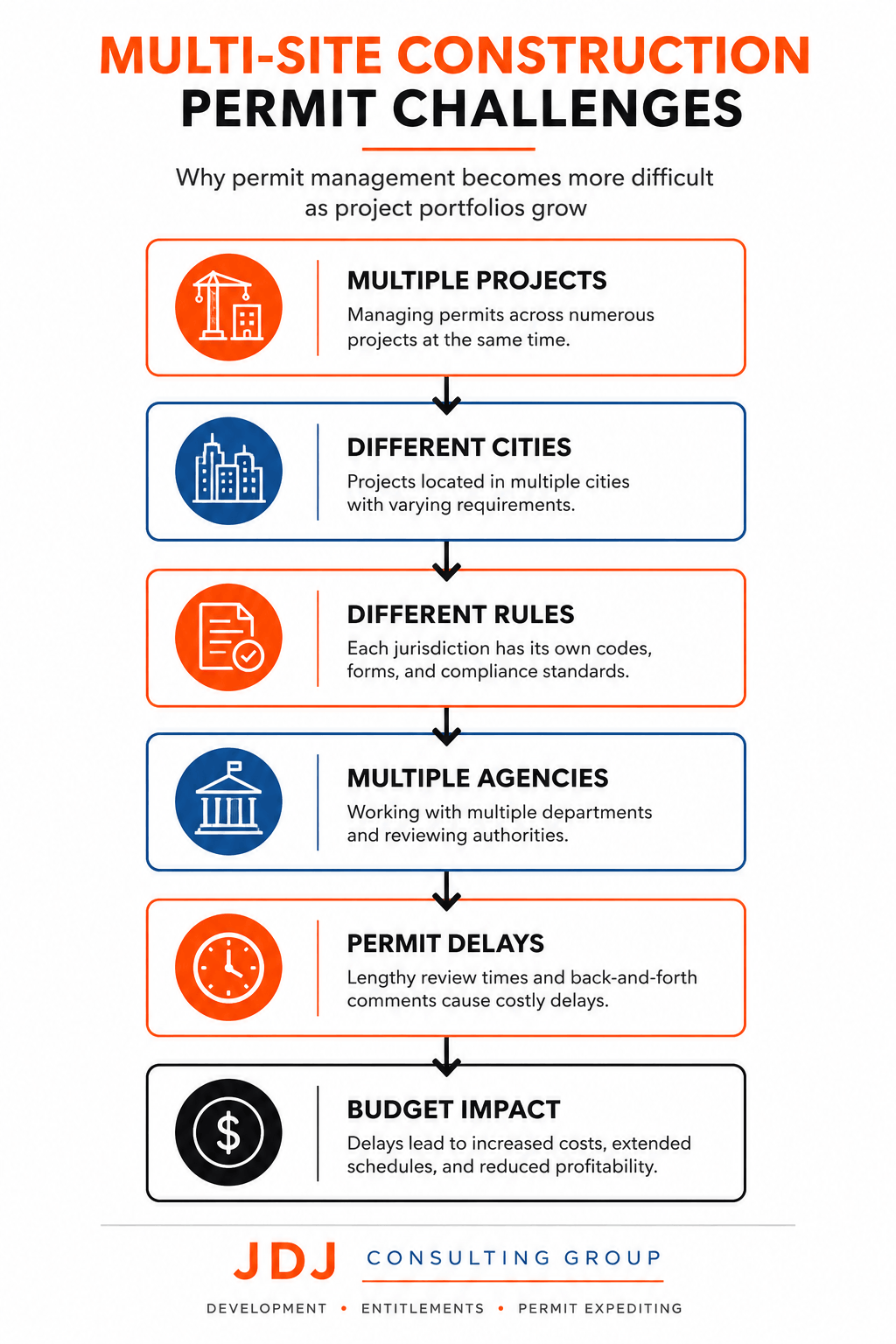
Managing permits for one project is rarely simple. Once a company starts building in multiple locations, the process becomes much more complicated. Every project can have different requirements, different review agencies, and different approval timelines.
Without a clear system, small issues can quickly turn into larger problems. Let’s look at the most common challenges.
Managing Different City and County Requirements
One of the biggest challenges is dealing with different local regulations. A permit package accepted in one city may not meet the requirements of another. Some jurisdictions require additional reports. Others have unique forms, fees, or review processes.
For example, a developer working in Los Angeles, Austin, and Miami may face three completely different permitting systems. This creates extra work for project teams.
Staff must learn local requirements, track changing regulations, and ensure every submission meets the correct standards. When information is stored in different places, mistakes become more likely.
Tracking Hundreds of Permit Applications
Large developers often have dozens of active projects at the same time. Each project may require several permits before construction begins. Building permits, grading permits, utility permits, environmental approvals, and occupancy permits all have separate review processes.
As permit volume grows, tracking everything manually becomes difficult. Teams may struggle to answer simple questions such as:
Which permits are under review?
Which permits have been approved?
Which applications need additional information?
Which permits are close to expiration?
Without real-time visibility, project managers spend valuable time searching for updates instead of managing projects.
Coordinating Teams Across Multiple Locations
Permitting is rarely handled by one person. Developers, architects, engineers, consultants, contractors, and government reviewers all play a role in the process. When projects are spread across multiple sites, communication becomes more challenging.
A design change made by one team member may affect permit submissions in another location. If updates are not shared quickly, teams may end up working with outdated information. This can create unnecessary delays and resubmissions. Good communication is essential when multiple stakeholders are involved.
Missing Permit Expiration Dates
Many permits have expiration dates. Some require construction to begin within a certain period. Others require renewals if work takes longer than expected. Unfortunately, permit expiration dates are easy to overlook when managing multiple projects.
A missed renewal can lead to:
Additional fees
Project delays
New permit applications
Extra review requirements
These problems can increase costs and disrupt construction schedules. For large project portfolios, keeping track of every deadline manually is risky.
Managing Permit Documents and Revisions
Permit applications often involve large amounts of documentation.
Teams may need to submit:
Site plans
Architectural drawings
Engineering reports
Environmental studies
Supporting calculations
Agency correspondence
As projects move through review, revisions are common. New versions of plans may be submitted several times before approval is granted. Without proper document control, teams may accidentally use outdated files or submit incorrect information. Even a simple version mistake can slow down approvals.
Responding to Agency Comments
Most permit applications receive comments from reviewers. These comments may request design revisions, additional studies, or clarification on specific items. Managing comments becomes more difficult when multiple projects are under review at the same time.
Teams must track:
Review comments
Responsible parties
Required revisions
Resubmission deadlines
If comments are missed or responses are delayed, approval timelines can quickly slip.
Limited Visibility for Leadership Teams
Project managers often know what is happening on individual projects. Executives and company leaders usually need a broader view.
They want answers to questions such as:
Which projects face permit risks?
Which approvals are causing delays?
How many permits are currently under review?
What projects are ready for construction?
Without centralized reporting, gathering this information can take significant time. As a result, leadership teams may not identify issues until they begin affecting project schedules.
The Cost of Permit Delays
Permit delays can have a direct impact on project budgets. When approvals take longer than expected, construction schedules often move back as well.
This can lead to:
Higher labor costs
Increased financing expenses
Contractor scheduling conflicts
Delayed revenue generation
Extended project timelines
For developers managing multiple projects, even small delays can create major financial consequences.
Why These Challenges Continue to Grow
Development projects are becoming more complex. Many projects now involve multiple agencies, stricter regulations, and larger teams. At the same time, developers are expanding into new markets and managing more locations than ever before. Because of this, traditional permit tracking methods often struggle to keep up.
Spreadsheets and email folders may work for a few projects. However, they become difficult to manage as permit volume increases. This is one reason permit management software has gained attention in recent years. It helps teams organize information, track approvals, and maintain visibility across every active project.
Features to Look for in Construction Permit Application Software
Not all permit software is built for multi-site projects. Some platforms work well for small teams managing a few permits. Others are designed for developers and contractors handling dozens of projects across different cities.
Before choosing a platform, it is important to understand which features will actually help your team. The right software should do more than store documents. It should make permit management easier, faster, and more organized.
Centralized Permit Dashboard
A centralized dashboard is one of the most valuable features. Instead of checking multiple spreadsheets, folders, and emails, teams can see all permit activity in one place.
A good dashboard should show:
Active permits
Pending approvals
Upcoming deadlines
Expiring permits
Project status updates
This gives project managers a quick overview of their entire permit portfolio. For companies managing multiple sites, visibility is critical.
Multi-Jurisdiction Tracking
Every city has its own permit process. A platform designed for multi-site projects should allow teams to track permits across different jurisdictions without creating separate systems for each location.
This feature helps teams:
Monitor city-specific requirements
Track review timelines
Store local agency information
Manage project-specific regulations
The more projects a company manages, the more valuable this becomes.
Automated Notifications and Alerts
Permit deadlines are easy to miss. Applications may require follow-ups. Review comments may need responses. Permits may also have renewal deadlines. Manual tracking increases the chance of something slipping through the cracks. Automated alerts help by sending reminders when action is needed.
Common alerts include:
Submission deadlines
Review updates
Permit approvals
Expiration dates
Required resubmissions
These notifications help teams stay ahead of potential delays.
Document Management and Version Control
Construction permits generate a large amount of paperwork. Plans, reports, studies, applications, and agency correspondence all need to be stored and organized. A strong document management system keeps everything in one location.
Version control is especially important. During the review process, project teams often submit revised plans several times. Software should clearly show which version is current and which versions are outdated. This reduces confusion and helps prevent submission errors.
Workflow Automation
Many permit-related tasks follow the same process.
For example:
Prepare application
Submit documents
Receive comments
Revise plans
Resubmit
Receive approval
Software can automate parts of this workflow. Instead of manually updating spreadsheets and sending emails, the system moves tasks through predefined stages. This saves time and improves consistency across projects.
Team Collaboration Tools
Permitting involves many stakeholders. Developers, architects, engineers, contractors, consultants, and agency reviewers may all contribute to the same application. Good software makes collaboration easier.
Useful collaboration features include:
Shared project dashboards
Task assignments
Comment tracking
Activity logs
Document sharing
When everyone works from the same platform, communication becomes more efficient.
Mobile Access
Construction teams do not always work from an office. Project managers often need access to permit information while visiting job sites, attending meetings, or meeting with local agencies.
Mobile access allows users to:
Check permit status
Upload documents
Review comments
View project records
This flexibility helps teams respond faster when issues arise.
Reporting and Analytics
As project portfolios grow, reporting becomes more important. Leadership teams need more than individual project updates. They need portfolio-wide insights.
Strong reporting tools can help answer questions such as:
How many permits are currently under review?
Which projects face approval delays?
What jurisdictions have the longest review times?
How many permits were approved this month?
These reports support better planning and decision-making.
GIS and Property Data Integration
Some permit platforms integrate with geographic information systems (GIS) and property databases. This allows users to access property information directly within the software.
Benefits may include:
Parcel information
Zoning details
Property boundaries
Location mapping
For developers evaluating multiple sites, this information can be useful during project planning.
Integration With Other Construction Software
Permit software should not operate in isolation. Many companies already use tools for project management, accounting, scheduling, and document control. Integration allows information to move between systems automatically. This reduces duplicate data entry and improves overall efficiency.
Common integrations may include:
Construction management platforms
Document management systems
Project scheduling software
Accounting software
Collaboration tools
Which Features Matter Most?
Not every company needs every feature. A builder managing five projects may focus on document management and deadline tracking. A national developer managing hundreds of permits may prioritize reporting, workflow automation, and portfolio visibility.
The key is finding software that matches your current needs while still supporting future growth. As permit volume increases, the value of automation, reporting, and centralized management becomes much more noticeable.
Best Construction Permit Application Software for Multi-Site Projects
Once you understand the features that matter, the next step is comparing the leading software options. Some platforms focus specifically on permitting. Others include permit tracking as part of a broader construction management system.
The best choice depends on your project volume, team size, and operational goals. Below are some of the most widely used solutions for multi-site construction projects.
PermitFlow
PermitFlow is one of the few platforms built specifically around permitting. Its primary focus is helping developers, builders, and contractors manage permit applications more efficiently.
The platform emphasizes:
Permit tracking
Submission management
Workflow automation
Jurisdiction coordination
Status visibility
Because permitting is its core function, it often appeals to teams that process large numbers of permits.
Best for: Developers and builders with high permit volume.
Strengths:
Permit-focused workflows
Strong visibility into approval status
Streamlined submission tracking
Easy-to-follow interface
Limitations:
Less comprehensive for overall construction management
May require integration with other project management tools
Autodesk Construction Cloud
Autodesk Construction Cloud is one of the most recognized platforms in the construction industry. While permit management is not its primary focus, it offers strong document control and project coordination capabilities. Many large developers already use Autodesk products, making integration a major advantage.
Best for: Large organizations managing complex projects.
Strengths:
Strong document management
Enterprise-level scalability
Extensive integrations
Widely used across the industry
Limitations:
Permit management is not the primary focus
Can be more complex to implement
Procore
Procore is another leading construction management platform. It provides tools for project management, collaboration, documentation, and workflow tracking. Many organizations use Procore alongside permit management processes because it centralizes project information.
Best for: Contractors and developers managing multiple active projects.
Strengths:
Strong collaboration tools
Excellent reporting
Mobile-friendly platform
Large integration ecosystem
Limitations:
Permit-specific functionality may be limited compared to dedicated solutions
PlanRadar
PlanRadar focuses on project documentation, communication, and field operations. The platform is particularly useful for teams that need mobile access and real-time project updates. Its flexibility makes it popular among companies managing projects across multiple locations.
Best for: Teams that prioritize mobility and field collaboration.
Strengths:
User-friendly interface
Strong mobile capabilities
Real-time communication tools
Good document organization
Limitations:
Less specialized for permit management
CMiC
CMiC is designed for larger construction organizations. It combines project management, financial management, and operational controls into a single platform. Many enterprise users choose CMiC because of its extensive functionality.
Best for: Large contractors and national developers.
Strengths:
Comprehensive project controls
Advanced reporting
Enterprise scalability
Strong portfolio oversight
Limitations:
Steeper learning curve
More complex setup process
Buildertrend
Buildertrend is commonly used by residential builders and smaller construction firms. While it is not a dedicated permit platform, it helps organize project information and workflows. For growing builders, it can provide a more affordable entry point into digital project management.
Best for: Residential builders and regional contractors.
Strengths:
Easy to use
Strong customer communication features
Affordable compared to enterprise platforms
Good project organization tools
Limitations:
Limited permit-specific capabilities
Less suitable for large development portfolios
Which Software Is Best?
There is no single solution that works for every company. The right platform depends on how your organization manages permits and projects.
In general:
Choose PermitFlow if permit management is your primary concern.
Choose Procore if you need strong project collaboration.
Choose Autodesk Construction Cloud for large, document-heavy developments.
Choose CMiC for enterprise-level portfolio management.
Choose PlanRadar if field communication is a priority.
Choose Buildertrend for smaller residential operations.
The most successful companies usually evaluate software based on their actual workflows rather than selecting the platform with the longest feature list.
Construction Permit Software Comparison Table
| Software | Best For | Permit-Focused | Multi-Site Management | Reporting & Analytics | Workflow Automation | Ease of Use |
|---|---|---|---|---|---|---|
| PermitFlow | High-volume permit management | ★★★★★ | ★★★★★ | ★★★★☆ | ★★★★★ | ★★★★★ |
| Procore | Contractors & developers | ★★☆☆☆ | ★★★★★ | ★★★★★ | ★★★★☆ | ★★★★☆ |
| Autodesk Construction Cloud | Enterprise developments | ★★☆☆☆ | ★★★★★ | ★★★★★ | ★★★★☆ | ★★★☆☆ |
| PlanRadar | Field teams & collaboration | ★★☆☆☆ | ★★★★☆ | ★★★☆☆ | ★★★☆☆ | ★★★★★ |
| CMiC | Large contractors & portfolios | ★★★☆☆ | ★★★★★ | ★★★★★ | ★★★★★ | ★★☆☆☆ |
| Buildertrend | Residential builders | ★☆☆☆☆ | ★★★☆☆ | ★★★☆☆ | ★★★☆☆ | ★★★★★ |
How to Evaluate Software for Multi-Site Development Portfolios
Choosing permit software is not just about features. A platform may look impressive during a demo but still fail to meet your needs. The best software is the one that fits your projects, team structure, and long-term growth plans.
Before making a decision, take a close look at how your organization manages permits today and where you expect growth in the future.
Consider the Number of Active Projects
Start with your project volume. A company managing five projects has different needs than a developer overseeing fifty projects across several states. As project numbers increase, permit tracking becomes more difficult.
Ask questions such as:
How many active projects do we manage?
How many permits are open at one time?
How quickly is our project pipeline growing?
Do we expect expansion into new markets?
The answers will help determine how much scalability you need.
Review Your Geographic Coverage
Location matters. If all projects are within one city, permit management may be fairly consistent. However, companies operating in multiple jurisdictions face more complexity.
Different cities often have different:
Application forms
Submission methods
Review timelines
Permit fees
Approval processes
The software should support permit tracking across all locations where your company operates. This becomes especially important for regional and national developers.
Evaluate Permit Volume
Not every project requires the same number of permits. Some developments may only need a handful of approvals. Others may require dozens. Higher permit volume increases administrative workload.
When evaluating software, consider:
Average permits per project
Total permits managed annually
Number of active applications
Permit renewal requirements
Organizations with high permit volume often benefit from automation and advanced reporting tools.
Assess Team Size and User Access
Permit management is rarely handled by one person. Developers, architects, engineers, consultants, project managers, and executives may all need access to project information. Good software should allow different access levels for different users. Role-based access helps protect information while ensuring team members can do their jobs efficiently.
Look at Reporting Requirements
Reporting becomes more important as organizations grow. Leadership teams often need answers quickly.
They may want to know:
Which permits are delayed?
Which projects face approval risks?
What permits are approaching expiration?
Which jurisdictions have the longest review times?
Software should make these reports easy to generate. The goal is to spend less time collecting data and more time acting on it.
Examine Integration Needs
Most companies already use several software platforms. Permit management software should fit into that environment.
Common integrations include:
Construction management software
Accounting systems
Project scheduling tools
Document management platforms
Collaboration software
Strong integrations reduce duplicate work and improve data accuracy.
Consider Ease of Use
Features are important, but usability matters just as much. Complicated software often leads to poor adoption. If team members avoid using the platform, the investment loses value.
During evaluations, ask:
Is the interface easy to understand?
How much training is required?
Can users find information quickly?
Is mobile access available?
Simple systems are often more successful than feature-heavy platforms that employees struggle to use.
Think About Future Growth
Many companies buy software based on current needs. That can create problems later. A platform that works well today may not support future expansion. Consider where your business may be in three to five years.
Questions to ask include:
Will we enter new markets?
Will project volume increase?
Will more team members need access?
Will reporting requirements become more complex?
Planning ahead can prevent costly software changes later.
Focus on Business Needs First
One of the most common mistakes companies make is choosing software based solely on features. A long feature list does not guarantee better results. Instead, focus on your actual business needs.
Start by identifying your biggest permitting challenges. Then compare platforms based on how well they solve those problems. The right software should make permit management easier, improve visibility across projects, and help reduce delays.
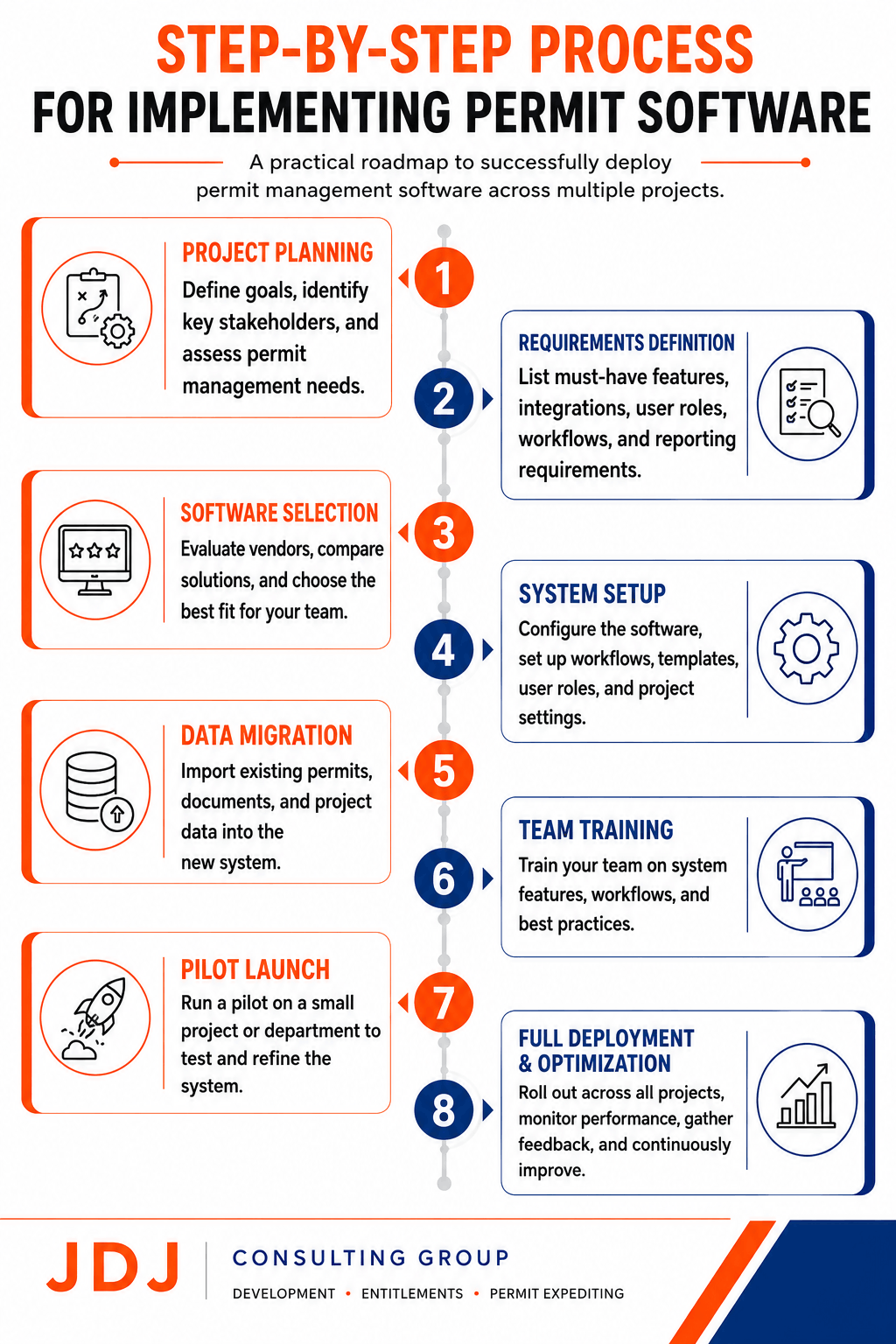
Step-by-Step Process for Implementing Permit Software
Choosing the right software is important. However, implementation is what determines whether the investment delivers value.
Many companies focus heavily on software selection and spend very little time planning the rollout. As a result, adoption suffers and teams continue relying on old processes.
A structured implementation plan helps avoid these problems. The goal is simple: create a system that teams actually use every day.
Step 1: Review Your Current Permit Process
Before implementing new software, understand how permits are managed today. Start by mapping your existing workflow.
Look at:
How permit applications are created
Where documents are stored
How approvals are tracked
How teams communicate updates
How deadlines are monitored
This exercise often reveals inefficiencies that have existed for years. Many companies discover they spend far more time on administrative tasks than expected.
Step 2: Identify Common Pain Points
Once your current process is documented, identify areas causing problems.
Common issues include:
Missed deadlines
Lost documents
Duplicate data entry
Poor communication
Limited reporting
Lack of project visibility
Understanding these challenges helps determine how the software should be configured. The implementation should solve real problems, not simply digitize existing inefficiencies.
Step 3: Standardize Permit Workflows
One major advantage of permit software is consistency. Before rollout, create standard workflows that can be used across projects whenever possible.
For example, establish a consistent process for:
Preparing applications
Reviewing documents
Submitting permits
Tracking agency comments
Managing revisions
Recording approvals
Standardized workflows reduce confusion and make training easier. They also improve reporting because projects follow similar processes.
Step 4: Organize Existing Permit Data
Most organizations already have large amounts of permit information.
This data may exist in:
Spreadsheets
Shared drives
Email folders
Paper files
Construction management systems
Before migrating information into the new platform, clean up outdated records and organize active project data. This prevents unnecessary clutter from entering the system.
Step 5: Configure User Roles and Permissions
Not everyone needs access to the same information. Setting up user permissions early helps maintain security and organization. Proper permissions help ensure users only see information relevant to their responsibilities.
Step 6: Import Active Projects
Once the system is configured, begin adding active projects. Focus on current projects first.
Key information may include:
Project details
Permit records
Agency contacts
Application status
Key deadlines
Supporting documents
This creates a strong foundation for future tracking and reporting.
Step 7: Train Your Team
Even the best software will fail without proper training. Training should focus on daily tasks rather than technical features.
Show users how to:
Find permit information
Upload documents
Update project status
Track deadlines
Generate reports
Keep training practical and role-specific. Project managers, consultants, and executives often use the system differently.
Step 8: Start With a Pilot Project
Many organizations benefit from testing the system before a full rollout. Choose a small group of projects and monitor performance closely.
This allows teams to:
Identify workflow issues
Gather feedback
Adjust configuration
Improve training materials
A pilot program reduces risk and often leads to a smoother company-wide implementation.
Step 9: Monitor Adoption
Implementation does not end when the software goes live. Track how employees are actually using the system.
Key indicators include:
Login frequency
Permit updates completed
Documents uploaded
Report usage
Workflow completion rates
If adoption is low, additional training or process improvements may be needed.
Step 10: Measure Results
After implementation, compare performance against your original goals.
Look at metrics such as:
Permit processing time
Number of missed deadlines
Document retrieval time
Reporting efficiency
Team productivity
These measurements help determine whether the software is delivering value.
Common Implementation Mistakes
Many software rollouts fail because companies rush the process.
Some of the most common mistakes include:
Migrating poor-quality data
Skipping workflow planning
Providing limited training
Ignoring user feedback
Overcomplicating processes
Trying to launch too many projects at once
Avoiding these mistakes can significantly improve long-term success.
A Successful Rollout Is About People, Not Software
Technology is only part of the equation. The most successful implementations combine good software with clear processes and proper training.
When teams understand the system and see its value, adoption becomes much easier. Over time, organizations gain better visibility, stronger reporting, and more consistent permit management across all projects.
Cost of Construction Permit Application Software
Cost is often one of the first questions companies ask when evaluating permit software. The answer depends on several factors, including company size, project volume, user count, and the level of functionality required.
Some platforms charge per user. Others use custom enterprise pricing based on project scale and organizational needs. Before comparing prices, it is important to look at the total value the software provides.
A cheaper platform may save money upfront. However, it can become expensive if it lacks the features needed to support your projects.
Typical Pricing Models
Most permit software providers use one of three pricing approaches.
Subscription-Based Pricing
This is the most common model. Companies pay a monthly or annual fee to access the platform.
Pricing often depends on:
Number of users
Number of projects
Storage requirements
Available features
This option works well for organizations that want predictable costs.
Per-User Pricing
Some providers charge for each user account. This model can be affordable for smaller teams. However, costs may increase quickly as organizations grow. Companies should evaluate future staffing needs before selecting this approach.
Enterprise Pricing
Large developers and contractors often require customized solutions.
Enterprise plans typically include:
Advanced reporting
Workflow automation
System integrations
Dedicated support
Custom configurations
Pricing is usually provided through a custom quote.
Factors That Affect Software Costs
Several factors influence pricing.
The biggest include:
Number of Active Projects
Companies managing hundreds of permits often require more advanced systems than organizations handling a small number of projects. Higher project volume usually increases software costs.
User Count
More users generally mean higher subscription fees. Organizations should determine how many people truly need system access.
Integration Requirements
Integrating permit software with existing construction management or accounting systems may increase implementation costs. However, integrations can save significant time in the long run.
Reporting and Analytics
Advanced reporting tools often come with higher-tier plans. For organizations managing large project portfolios, these features can provide substantial value.
The Hidden Cost of Manual Permit Tracking
When evaluating software costs, it is important to compare them against the cost of existing processes. Many companies focus only on subscription fees. However, manual permit management often creates hidden expenses.
These may include:
Employee time spent tracking permits
Delayed approvals
Missed deadlines
Permit resubmissions
Lost documentation
Administrative inefficiencies
Over time, these costs can exceed the price of the software. For organizations managing multiple projects, even a single permit delay can have a significant financial impact.
Return on Investment
The return on investment often comes from improved efficiency rather than direct cost savings.
Benefits may include:
Faster permit tracking
Better project visibility
Fewer missed deadlines
Improved communication
Reduced administrative workload
Stronger reporting capabilities
The larger the project portfolio, the easier it becomes to justify the investment.
Software Is Only Part of the Solution
While software can improve organization and visibility, it does not eliminate permitting challenges.
Projects still require:
Proper application preparation
Agency coordination
Compliance reviews
Entitlement planning
Permit follow-up
This is why many developers combine software with professional permit consulting and expediting services. Technology improves efficiency, but experienced guidance often helps move projects through approvals more effectively.
Permit Software vs Permit Expediting Services
Many developers assume software will solve every permitting challenge. In reality, software and permit expediting services serve different purposes. Understanding the difference helps companies choose the right approach.
What Permit Software Does Well
Permit software is designed to organize information.
It helps teams:
Track applications
Manage documents
Monitor deadlines
Generate reports
Improve visibility
These tools create structure and make information easier to access. For large project portfolios, this can be extremely valuable.
What Software Cannot Do
Software cannot replace professional judgment.
It cannot:
Meet with agency staff
Resolve entitlement issues
Interpret complex zoning regulations
Negotiate project conditions
Address unexpected review comments
These tasks still require experienced professionals.
Where Permit Expediting Adds Value
Permit expeditors work directly with agencies and project teams.
Their role often includes:
Reviewing application requirements
Coordinating submissions
Monitoring approvals
Following up with reviewers
Addressing permit issues
Helping reduce delays
For complex developments, this expertise can significantly improve approval timelines.
When Software Alone May Be Enough
Software may be sufficient when:
Projects are relatively simple
Permits are routine
Internal teams have permitting experience
Jurisdictions have straightforward approval processes
In these situations, technology can often handle most organizational needs.
When Professional Support Makes Sense
Many developments benefit from additional expertise.
This is especially true when projects involve:
Multiple jurisdictions
Entitlement approvals
Zoning challenges
Large development sites
Tight construction schedules
High permit volume
In these cases, experienced consultants can help identify issues before they become costly delays.
The Best Approach for Large Portfolios
For many developers, the strongest solution combines both. Software provides organization and visibility. Professional permit consultants provide expertise and agency coordination. Together, they create a more efficient permitting process.
Conclusion
Managing permits across multiple projects is challenging. As project portfolios grow, spreadsheets and email chains often become difficult to manage. Teams need better visibility, stronger document control, and more reliable tracking systems.
Construction permit application software helps solve many of these challenges.
The best platforms centralize permit information, automate routine tasks, improve reporting, and make it easier to manage projects across multiple jurisdictions. However, software should not be viewed as a complete replacement for permitting expertise.
Complex developments still require careful planning, agency coordination, and regulatory knowledge. For most organizations, the best results come from combining technology with experienced permit professionals.
By selecting the right software and building strong permitting processes, developers can reduce delays, improve efficiency, and maintain better control over growing project portfolios.
If you’re evaluating permit management solutions or facing permitting challenges on active developments, JDJ Consulting Group can help. Our team supports permit expediting, entitlement strategy, feasibility studies, due diligence, and development consulting throughout Los Angeles, Austin, Miami, and projects nationwide. Call (818) 793-5058 or email sales@jdj-consulting.com for a free consultation.